
Google Business Profile optimisation is the process of completing, refining, and actively maintaining your business listing to improve local search rankings and customer interactions. For small and medium businesses in Derbyshire, a well-managed profile is one of the most cost-effective ways to attract local customers. A well-optimised profile outperforms many paid marketing channels for local visibility. Google’s own local ranking algorithm rewards completeness, accuracy, and ongoing activity. Get these right, and your phone starts ringing.
How does Google Business Profile optimisation work?
Google Business Profile (formerly known as Google My Business) is a free listing that appears in Google Search and Google Maps when someone searches for a local business. Optimising it means filling every available field, keeping information current, and signalling to Google that your business is active and relevant. Google uses three main factors to rank local listings: relevance, distance, and prominence. Prominence is the one you can most directly influence through your profile activity.
The process is not a one-off task. Optimisation is a continuous maintenance process, and Google rewards profiles where all fields are complete and regularly updated. Think of your profile as a living shop window, not a static directory entry.

How to claim and verify your Google Business Profile
Claiming your profile is the first step. Visit business.google.com and search for your business name. If a listing already exists, request ownership. If not, create a new one from scratch.
Once you submit your details, Google requires verification before your profile goes live and becomes editable. The verification options are:
-
Postcard. Google posts a card to your business address containing a PIN. Postcard verification typically takes 5–14 days to arrive. Enter the PIN in your profile dashboard to complete verification.
-
Phone or email. Available for some business types. Google sends a code instantly, which you enter to verify.
-
Video verification. Google may request a short video showing your premises, signage, and proof of operation. This method is increasingly common for new listings.
Make sure you have owner or manager access to the profile, not just basic access. Only owner-level access lets you make all critical changes, including transferring ownership or requesting reinstatement if the profile is suspended.
Pro Tip: Plan your initial profile content before you start verification. You cannot fully edit or publish your profile until verification is complete, so having your photos, description, and category choices ready means you can go live immediately once the PIN arrives.
Avoid common pitfalls during verification. Do not change your business address mid-process, as this resets verification. Use your exact registered trading address, formatted in the standard UK postal format.
What categories and business information should you include?
Selecting the right primary category is the single most important decision you make during setup. Choosing a precise primary category is the top ranking factor for local searches. A plumber in Derby should select “Plumber,” not “Home Services.” A bakery in Chesterfield should select “Bakery,” not “Food and Drink.” Specificity wins every time.
Secondary categories add context without diluting your primary signal. A joinery business might add “Kitchen Fitter” or “Carpenter” as secondary categories. Keep secondary categories relevant and limited to services you genuinely offer.
Your core business information must be accurate and consistent across every platform. This is known as NAP consistency: Name, Address, and Phone number. Inconsistent NAP details confuse Google and reduce your local search visibility. If your website says “07700 900000” and your profile says “07700900000,” that inconsistency matters.
Complete every available field:
-
Business name. Use your exact trading name. Do not add keywords or location names to your business name field.
-
Address or service area. If you serve customers at their location (such as a mobile dog groomer or a Derbyshire-based electrician), set a service area rather than a physical address.
-
Phone number. Use a local Derbyshire number where possible. It builds trust with local searchers.
-
Opening hours. Keep these accurate, including bank holidays and seasonal changes.
-
Business description. Write 250–750 words describing what you do, who you serve, and what makes you different. Write naturally. Do not stuff keywords.
-
Website URL. Link directly to your homepage or a relevant landing page.
Pro Tip: Set up special hours for bank holidays in advance. Google flags businesses as “may have different hours” during public holidays, which can deter customers. Proactively updating your hours removes that uncertainty.
How do photos, reviews, and posts improve your profile?
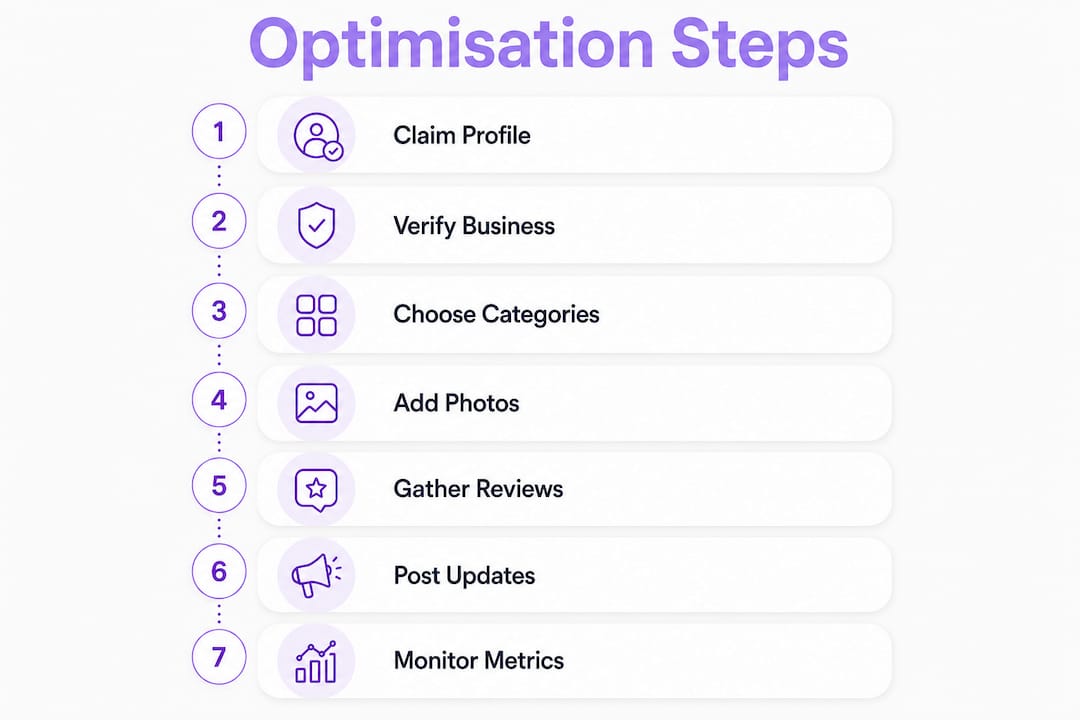
Photos, reviews, and posts are the three ongoing activities that build profile prominence over time. Each one sends a different signal to Google and to potential customers.
Photos that build trust
Upload real photos of your work, premises, team, and vehicles. Avoid stock images. A Derbyshire landscaping company showing before-and-after garden transformations builds far more trust than a generic green-field image. Add new photos regularly. Google tracks photo activity as a signal of profile engagement.
Reviews that drive rankings
Review quality matters more than volume. Review text containing natural mentions of services and local areas improves your relevance in local searches more than a high star rating alone. A review that says “brilliant boiler repair in Matlock, fixed within two hours” is more valuable than a five-star review with no text.
Build a consistent system for requesting reviews. Ask satisfied customers by text or email shortly after completing a job. Make it easy by sending a direct link to your review page.
Responding to every review within 48 hours strengthens trust and improves ranking signals. Google tracks your response rate. Reply to negative reviews calmly and professionally. A thoughtful response to a complaint often reassures potential customers more than a string of five-star reviews.
Posts that signal activity
Regular Google posts with local content tell Google your business is active and relevant. Post weekly or fortnightly. Share offers, completed projects, seasonal updates, or local news relevant to your trade. A Derbyshire roofing company might post about storm damage repairs after a wet autumn. Keep posts short, specific, and linked to a relevant page on your website.
The Q&A section is often overlooked. Seed it with the questions your customers ask most often. Answer them yourself before a stranger does.
How do you maintain and monitor your profile over time?
Profile maintenance is what separates businesses that hold their local rankings from those that slip. Profiles that remain inactive or carry outdated information lose rankings over time. Google rewards ongoing activity.
Run a quarterly audit covering these areas:
-
Check your business name, address, phone number, and website URL are still accurate.
-
Update opening hours for upcoming bank holidays or seasonal changes.
-
Review your primary and secondary categories. Have your services changed?
-
Check the Q&A section for new questions or inaccurate answers posted by others.
-
Scan for any profile edits suggested by Google or the public. Approve or reject them promptly.
Track your profile metrics monthly inside the Google Business Profile dashboard. Monitor calls, direction requests, website clicks, and photo views. A drop in calls or direction requests often signals a ranking change worth investigating.
Sync your profile information with your website and any other directory listings. If you update your phone number on your profile, update it on your website, Facebook page, and any local directories at the same time.
Pro Tip: Set a recurring monthly calendar reminder to check your profile metrics and a quarterly reminder for a full audit. Fifteen minutes a month is enough to catch problems before they affect your rankings.
Key takeaways
A fully completed, consistently maintained Google Business Profile is the most direct way for a Derbyshire SME to improve local search visibility and generate more customer enquiries.
| Point | Details |
|---|---|
| Verify before you optimise | Complete verification at business.google.com before editing your profile fields. |
| Primary category is critical | Choose the most specific category that matches your core service to maximise local ranking. |
| NAP consistency matters | Keep your name, address, and phone number identical across your website and all directories. |
| Reviews need text and responses | Ask customers for detailed reviews and reply to every one within 48 hours. |
| Activity sustains rankings | Post updates, add photos, and audit your profile quarterly to stay visible over time. |
What I have learned from years of local SEO work
Running Google Business Profile audits for UK businesses has taught me one consistent lesson: most SMEs set up their profile once and forget it. They pick a broad category, upload two photos, and assume the work is done. Then they wonder why a competitor with a scrappier website ranks above them.
The businesses that win local search are not always the biggest or the best. They are the most consistent. They respond to reviews the same week they land. They post an update after every completed project. They check their hours before every bank holiday. None of this takes more than 20 minutes a week.
The biggest mistake I see is treating the primary category as an afterthought. I have watched businesses jump several positions in local search simply by switching from “Home Services” to “Electrician.” That single change, done in under a minute, produced results that months of posting had not.
My honest advice: prioritise your primary category and your review management above everything else. Get those two right, and the rest of the profile work compounds on top of a solid foundation. Do not wait for a perfect strategy before you start. A consistent, imperfect effort beats a perfect plan that never gets executed.
— Luke
How Jarvisandco can help your Derbyshire business get found
Getting your Google Business Profile right takes time and attention. If you are running a business in Derbyshire and want expert support to improve your local visibility, Jarvisandco is here to help.

Jarvisandco is a creative design agency with over 15 years of experience in website design, branding, and digital marketing across the UK. The team works with small and medium businesses to build a strong online presence, from local SEO support to bespoke website design that converts visitors into customers. Whether you need a full profile audit or a broader digital marketing plan, Jarvisandco offers practical, no-nonsense support tailored to your business.
FAQ
What is Google Business Profile optimisation?
Google Business Profile optimisation is the process of completing and maintaining your free Google listing to improve your visibility in local search results and Google Maps. It covers categories, photos, reviews, posts, and accurate business information.
How long does Google Business Profile verification take?
Postcard verification takes 5–14 days. Phone and email verification, where available, is instant. Video verification timelines vary but are typically resolved within a few days.
Why does my primary category matter so much?
A precise primary category is the top local ranking factor on Google. Choosing a broad category reduces your relevance for specific searches and hands an advantage to competitors who have chosen more specific ones.
How often should I update my Google Business Profile?
Post updates at least fortnightly, add new photos monthly, and run a full profile audit every quarter. Inactive profiles lose rankings over time, so regular activity is not optional.
Do reviews really affect my local ranking?
Yes. Review text mentioning your services and location improves your relevance in local searches. Responding to every review also strengthens your ranking signals and builds customer trust.