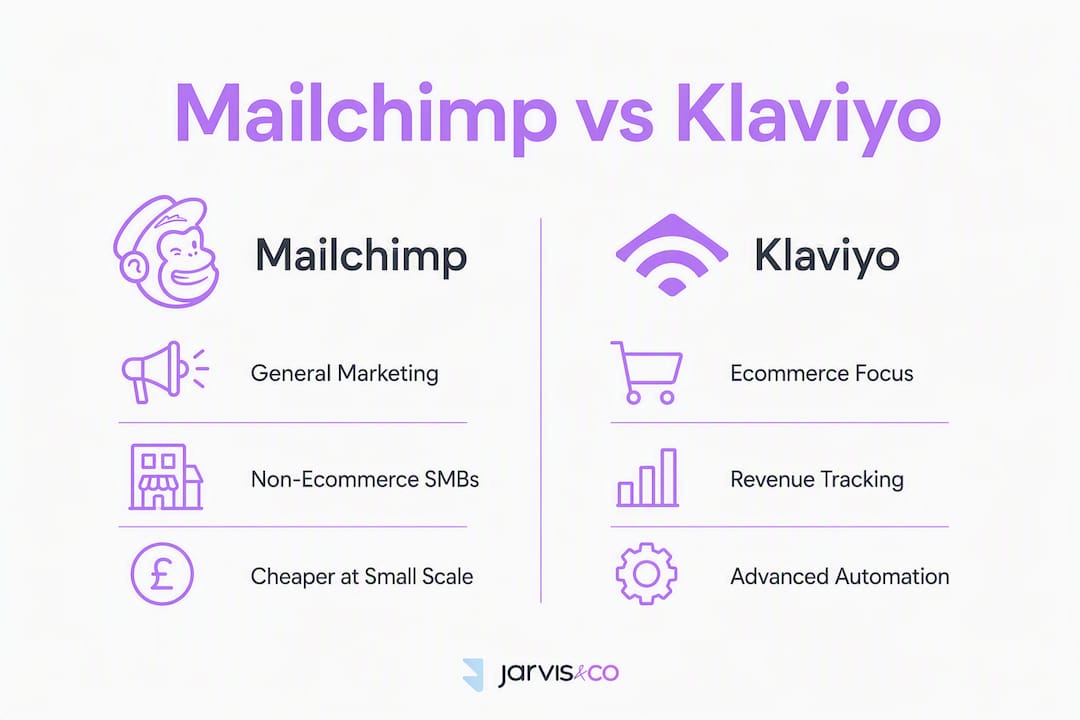
If you run a UK ecommerce store that tracks revenue from email, Klaviyo is usually the better choice. For general newsletters, simple campaigns, or a non-ecommerce small business, Mailchimp is often the quicker, cheaper start.
The deciding factors are straightforward: does revenue run through an online cart, how large is your list, and do you need SMS in the same platform? If the answer to the first question is yes, Klaviyo's real-time Shopify integration and pre-built ecommerce flows give it a clear edge. If not, Mailchimp's broader marketing toolkit and permanent free tier make more sense.
You'll find a full decision checklist and migration steps further down.
Table of Contents
- How do Mailchimp and Klaviyo compare side by side?
- How does pricing behave as your list grows?
- What ecommerce features and integrations does each platform offer?
- How do automation and segmentation compare?
- Which platform is easier to learn and set up?
- What about deliverability, GDPR, and UK data rules?
- How do you migrate from Mailchimp to Klaviyo?
- Which platform should you choose?
- How Jarvisandco tested these platforms
- Key takeaways
- The pattern we keep seeing
- Jarvisandco can handle the setup for you
- Useful sources and further reading
How do Mailchimp and Klaviyo compare side by side?
| Dimension | Mailchimp | Klaviyo |
|---|---|---|
| Best for | General marketing, non-ecommerce SMBs | Ecommerce stores, Shopify merchants |
| Free tier | Yes, up to 500 contacts | Yes, up to 250 contacts |
| Billing model | Contact-based (includes unsubscribed) | Active profile-based (excludes suppressed) |
| Ecommerce & revenue attribution | Basic | Advanced, native |
| Pre-built flows | Limited | Abandoned cart, browse, post-purchase, winback |
| SMS | Paid add-on | Native channel |
| Segmentation | Tags, groups, basic filters | Real-time behavioural, predictive |
| Shopify integration | Standard | Deep, real-time event capture |
| Reporting | Standard campaign stats | Revenue-per-recipient, predictive CLV |
| Ease of use | Easier for beginners | Steeper curve, more control |
| GDPR tools | Consent forms, data export | Consent forms, data export, profile suppression |
| Support | Email, chat (paid), knowledge base | Email, chat, phone (paid plans) |

The three biggest differentiators: Klaviyo's billing excludes suppressed contacts (so a messy list costs you less); SMS is a native channel rather than a bolt-on; and revenue attribution is built in, not an afterthought.
Billing note: Mailchimp counts unsubscribed and archived contacts towards your plan limit unless you manually archive them. Klaviyo only bills for active profiles, excluding suppressed or unengaged contacts. The same raw list of contacts can produce materially different invoices on each platform.
How does pricing behave as your list grows?
Both platforms publish tiered pricing based on contact or profile counts. The gap closes and sometimes reverses at scale.
Pricing varies with list size, with Mailchimp often cheaper at smaller counts and Klaviyo sometimes more cost-effective at larger counts; exact prices depend on current published rates.
Figures are approximate published rates; check each platform's pricing page for current UK pricing.
Mailchimp looks cheaper at smaller list sizes, but that changes. Between roughly 5,000 and 10,000 contacts, Klaviyo can become the better value for ecommerce stores once you factor in the revenue its flows produce. One sample comparison on a mid-size Shopify store found Klaviyo cost more but also generated significantly more attributed revenue.
Hidden costs to watch: Mailchimp's automation features are locked behind higher-tier plans, SMS credits are billed separately, and overage fees apply if you exceed your contact limit mid-month. Klaviyo's SMS is native but still billed per message.
Pro Tip: Clean your list before running any pricing comparison. Removing unsubscribed and inactive contacts can shift Mailchimp's invoice significantly, since it bills for contacts you can no longer reach.
What ecommerce features and integrations does each platform offer?
This is where the two platforms diverge most clearly.
Klaviyo and Shopify
Klaviyo's Shopify integration captures events in real time: cart additions, product views, checkout starts, and completed orders all flow into customer profiles automatically. That data powers pre-built flows out of the box:
- Abandoned cart sequences (triggered within minutes of abandonment)
- Browse abandonment (triggered after a product view with no purchase)
- Post-purchase follow-ups and cross-sell sequences
- Winback campaigns based on predicted churn risk
Revenue attribution is native. You can see exactly how much each flow, campaign, or individual email generated, down to the recipient level.
Mailchimp and Shopify
Mailchimp connects to Shopify but the integration is less granular. Browse abandonment is not available on all plans, and revenue attribution is basic rather than per-recipient. The connection works well for order confirmations and simple abandoned cart reminders, but it does not capture the full event stream that powers predictive segments.
Klaviyo is often recommended for stores that prioritise revenue-per-email and real-time event capture. Mailchimp suits merchants who want straightforward order notifications and simple campaign sends without the setup complexity.
Both platforms integrate with WooCommerce and BigCommerce, though Klaviyo's event-level depth applies across all three. For UK merchants using platforms like Wix eCommerce or Squarespace, Mailchimp's broader native integrations can be an advantage.
SMS: Klaviyo treats it as a native channel within the same flow builder. Mailchimp issues SMS as a paid add-on with monthly credits, which complicates multi-channel flow building and adds a separate billing line.
How do automation and segmentation compare?
Klaviyo's flow builder is event-driven. A customer browsing a product page, abandoning a cart, or making a second purchase each trigger separate, real-time automations. Mailchimp's automation is more audience-driven: you define a segment, then send to it on a schedule or simple trigger.

For most non-ecommerce businesses, Mailchimp's approach is perfectly adequate. For stores, the difference matters.
Klaviyo includes predictive fields on paid plans: predicted customer lifetime value, next expected order date, and churn risk score. These feed directly into segments, so you can target "high CLV customers likely to churn" without any manual data work. Mailchimp does not offer equivalent predictive analytics natively.
Pro Tip: Predictive segments start to outperform simple rule-based segments once your store has at least 1,000 purchase events in Klaviyo's system. Below that threshold, the model lacks enough data to be reliable, and a straightforward "purchased in the last 90 days" segment works just as well.
Real-time behavioural segments in Klaviyo update continuously. A customer who makes a purchase drops out of an abandoned cart flow immediately. In Mailchimp, segment refresh intervals can introduce a lag, which occasionally results in a customer receiving a discount they no longer need.
Which platform is easier to learn and set up?
Mailchimp is quicker to learn for beginners. The drag-and-drop editor is intuitive, the template library is large, and you can send your first campaign within an hour of signing up. Klaviyo offers more control but takes longer to configure correctly.
Core setup stages for either platform:
- Create your account and authenticate your sending domain (SPF, DKIM, DMARC records).
- Connect your ecommerce platform (Shopify, WooCommerce, or BigCommerce).
- Set up your signup forms and map them to the correct lists or profiles.
- Build or activate your first automated flows (abandoned cart as a minimum).
- Monitor deliverability for the first two to four weeks and adjust sending frequency if needed.
Pro Tip: A Shopify store integration with Klaviyo typically takes a marketing person several days to configure properly, including flows and forms. Budget some developer time if you need custom event tracking beyond Klaviyo's default Shopify events.
Mailchimp's all-in-one positioning, which includes landing pages, social ad tools, and a basic website builder, means fewer tools to manage for non-ecommerce businesses. That breadth becomes a ceiling when you need advanced segmentation or attribution.
What about deliverability, GDPR, and UK data rules?
Both platforms maintain strong deliverability infrastructure. Klaviyo's profile hygiene model, which automatically suppresses unengaged contacts, tends to keep sender reputation cleaner over time. Mailchimp requires more manual list management to achieve the same result.
For UK businesses, both platforms act as data processors under UK GDPR. Key practical points:
- Both support double opt-in forms and store consent timestamps.
- Both allow you to export subscriber data and process deletion requests.
- Klaviyo's profile suppression means unsubscribed contacts are excluded from sends automatically and from billing.
- Data is primarily processed on US-based infrastructure. Both platforms rely on Standard Contractual Clauses for UK-to-US data transfers under the UK GDPR framework.
The ICO's guidance on email marketing and consent records is the primary reference for UK businesses. Neither platform replaces the need to review your own privacy policy and consent capture process.
This is general information, not legal advice. Confirm your specific obligations with a qualified data protection professional or the ICO directly.
How do you migrate from Mailchimp to Klaviyo?
Migration is straightforward if you follow the steps in order.
- Audit your list. Remove unsubscribed, bounced, and inactive contacts before exporting. This reduces your Klaviyo profile count and your bill.
- Export from Mailchimp. Download your subscriber list as a CSV, including tags, segments, and suppression lists.
- Import into Klaviyo. Map your Mailchimp tags to Klaviyo lists and segments. Import your suppression list separately to prevent sending to unsubscribed contacts.
- Reconnect signup sources. Update your website forms, pop-ups, and any third-party integrations to point to Klaviyo.
- Rebuild key flows. Start with abandoned cart, then post-purchase and winback. Do not simply copy Mailchimp sequences; rebuild them using Klaviyo's event triggers.
- Validate revenue attribution. Place a test order and confirm the purchase event appears in Klaviyo within a few minutes.
- Update DNS authentication. Verify your SPF, DKIM, and DMARC records are correctly configured for Klaviyo's sending infrastructure.
- Run both platforms in parallel for two to four weeks. Keep Mailchimp active until you confirm Klaviyo flows are firing correctly and deliverability is stable.
Do not cancel Mailchimp on day one. A two-to-four week parallel run catches missed signup sources and flow gaps before they affect revenue.
Pro Tip: Revenue attribution validation is the step most migrations skip. Send a test transaction through your Shopify store and check that the order appears in Klaviyo's event feed within five minutes. If it does not, your integration is not firing correctly and your flow triggers will not work.
Expect a short data lag of 24–48 hours for historical order data to populate fully in Klaviyo after the initial Shopify sync.
Which platform should you choose?
Work through these questions:
- Do you run an online store? If yes, Klaviyo. If no, Mailchimp is likely sufficient.
- Is revenue attribution important to you? Klaviyo tracks this natively; Mailchimp does not at the same depth.
- How large and clean is your list? Under 1,000 contacts, Mailchimp's free tier wins. Above 5,000, compare active profiles carefully.
- Do you need email and SMS in one platform? Klaviyo handles both natively.
- Do you need landing pages, social ads, or a basic site builder? Mailchimp includes these; Klaviyo does not.
One-sentence recommendation: Choose Klaviyo if your business measures revenue from email flows and runs a Shopify or similar store; choose Mailchimp if you need a simple, multi-channel marketing tool for a non-ecommerce audience.
Re-evaluate your choice when your store GMV grows to a point where a £150–£200/month difference in platform cost is easily offset by one additional recovered cart sequence.
How Jarvisandco tested these platforms
Jarvisandco's evaluation draws on real-world client work across UK Shopify stores, including pricing worksheets built from published plan data, deliverability spot checks during onboarding periods, and hands-on flow configuration for ecommerce clients.
Jarvisandco has worked on Shopify integrations and email platform migrations for UK SMEs across retail, aesthetics, and professional services for over 15 years. Our assessments reflect what we see in live accounts, not just published feature lists.
Limitations: account-level pricing can vary, and Klaviyo's predictive features improve with data volume, so results differ by store size and catalogue depth. If you want a custom audit of your specific setup, get in touch with Jarvisandco.
Key takeaways
Klaviyo is the stronger choice for UK ecommerce stores that measure revenue from email; Mailchimp suits non-ecommerce businesses that want a simple, all-in-one marketing tool at a lower entry cost.
| Point | Details |
|---|---|
| Ecommerce vs general marketing | Klaviyo wins for stores; Mailchimp suits non-ecommerce or very small lists. |
| Pricing crossover | Between 5,000 and 10,000 contacts, Klaviyo can become better value for stores. |
| Billing definitions matter | Mailchimp bills for unsubscribed contacts; Klaviyo only bills active profiles. |
| Migration approach | Run both platforms in parallel for two to four weeks before cancelling Mailchimp. |
| Jarvisandco support | Jarvisandco handles Shopify integrations, email migrations, and flow setup for UK SMEs. |
The pattern we keep seeing
Most UK store owners who ask us about this comparison are already on Mailchimp and wondering whether to switch. The honest answer is: it depends almost entirely on whether you are actively measuring revenue from your email flows.
If you are not tracking which emails generate purchases, you are not yet using either platform to its potential. Klaviyo's attribution tools only matter if you are going to act on the data. For a business that sends a monthly newsletter and the occasional promotion, Mailchimp's simplicity and lower entry cost are genuinely the right fit.
Where we see the switch pay off is when a store starts recovering abandoned carts consistently and wants to layer in browse abandonment and predictive winback. At that point, Mailchimp's feature ceiling becomes a real constraint, not a theoretical one. The stores that benefit most from Klaviyo are those already generating enough email-attributed revenue to make the higher monthly cost irrelevant within a few weeks.
The resourcing question matters too. Klaviyo rewards investment. A half-configured Klaviyo account with no active flows will underperform a well-maintained Mailchimp setup every time. If you do not have someone who can own the platform properly, either bring in agency support or stay on Mailchimp until you do.
Jarvisandco can handle the setup for you
Setting up Klaviyo properly takes time. Getting the Shopify integration right, building flows that actually fire, and validating revenue attribution are all steps where small errors cost real money.
Jarvisandco works with UK ecommerce businesses on exactly this: Shopify store integrations, email platform migrations, flow builds, deliverability audits, and creative email templates. We give you an honest recommendation on which platform fits your business before we touch a single setting. If you are already on Mailchimp and wondering whether Klaviyo is worth it, we can run through your numbers with you.
Get in touch with Jarvisandco to book a free initial conversation about your email setup.
Useful sources and further reading
- Klaviyo vs. Mailchimp: tested and compared (G2 Learn)
- ICO guidance on email marketing and consent
- Jarvisandco: Shopify design and ecommerce services
- Shopify conversion rate benchmarks for UK stores (Jarvisandco)