Most UK small businesses pay between £50 and £300 per month for website maintenance. That works out to £600–£3,600 per year for a typical managed plan. E-commerce sites and more complex builds sit higher, often £150–£600 per month or more.
Here is what that monthly fee usually covers:
- Hosting (shared or managed, depending on the plan)
- CMS, plugin, and theme updates
- Daily or weekly backups
- Uptime and security monitoring
- Small content edits (typically 1–2 hours per month)
- SSL certificate management
A figure below £30 per month is almost always automation-only: updates run on a schedule with no human checking whether they break anything. That is a risk, not a saving. At the other end, plans above £500 per month typically include SEO, content creation, conversion work, or dedicated development hours — these are growth retainers, not basic upkeep.
If you run a brochure site and want genuine human oversight, budget at least £75–£150 per month. If your site takes orders, budget from £200 upwards.
Key takeaways
Most UK SMEs should budget between £75 and £300 per month for genuine human-managed website maintenance, with e-commerce and complex sites sitting higher and automation-only plans carrying real risks that offset their lower price.
| Point | Details |
|---|---|
| Headline monthly range | Brochure sites: £75–£150/month; small e-commerce: £150–£400/month; growth retainers: £300–£600/month |
| Automation-only risk | Plans below £50/month typically apply updates without human testing — a broken update can take your site offline |
| Annual budget planning | Add pass-through costs (hosting, domain, SSL) to retainer labour; a £100/month plan costs £1,200/year before extras |
| WordPress costs more | Plugin governance, staging, and compatibility testing add real labour hours that justify higher WordPress maintenance fees |
| Jarvisandco managed plans | Jarvisandco offers UK SME maintenance retainers with staging-tested updates, monitoring, backups, and a clear monthly SLA |
Table of Contents
- How much does website maintenance cost UK businesses each month?
- What does website maintenance actually include?
- What do the pricing tiers actually buy you?
- How much should you budget by website type?
- Why do WordPress sites often cost more to maintain?
- What makes one quote higher than another?
- DIY versus hiring a professional: what does each actually cost?
- How do you choose a website maintenance provider?
- Sample budgets and contract types
- How we calculated these figures
- An honest view on what the numbers actually mean
- Jarvisandco's managed website maintenance for UK SMEs
- Sources
How much does website maintenance cost UK businesses each month?
Monthly fees and annual totals are not the same thing, and the gap matters when you are planning a budget. A £100-per-month plan costs £1,200 per year in retainer fees alone. Add pass-through costs and the real annual spend is higher.

The line items behind the headline number
DevsTree's UK pricing breakdown lists the baseline costs every site carries regardless of who manages it:
| Line item | Typical UK range |
|---|---|
| Domain renewal (.co.uk) | £10–£20 per year |
| Shared hosting | £5–£15 per month |
| Managed WordPress hosting | £20–£50 per month |
| VPS or cloud hosting | £50–£150 per month |
| SSL certificate | Often included; premium from £50/year |
| Automated backups | £5–£20 per month |
| Basic security monitoring | £10–£30 per month |
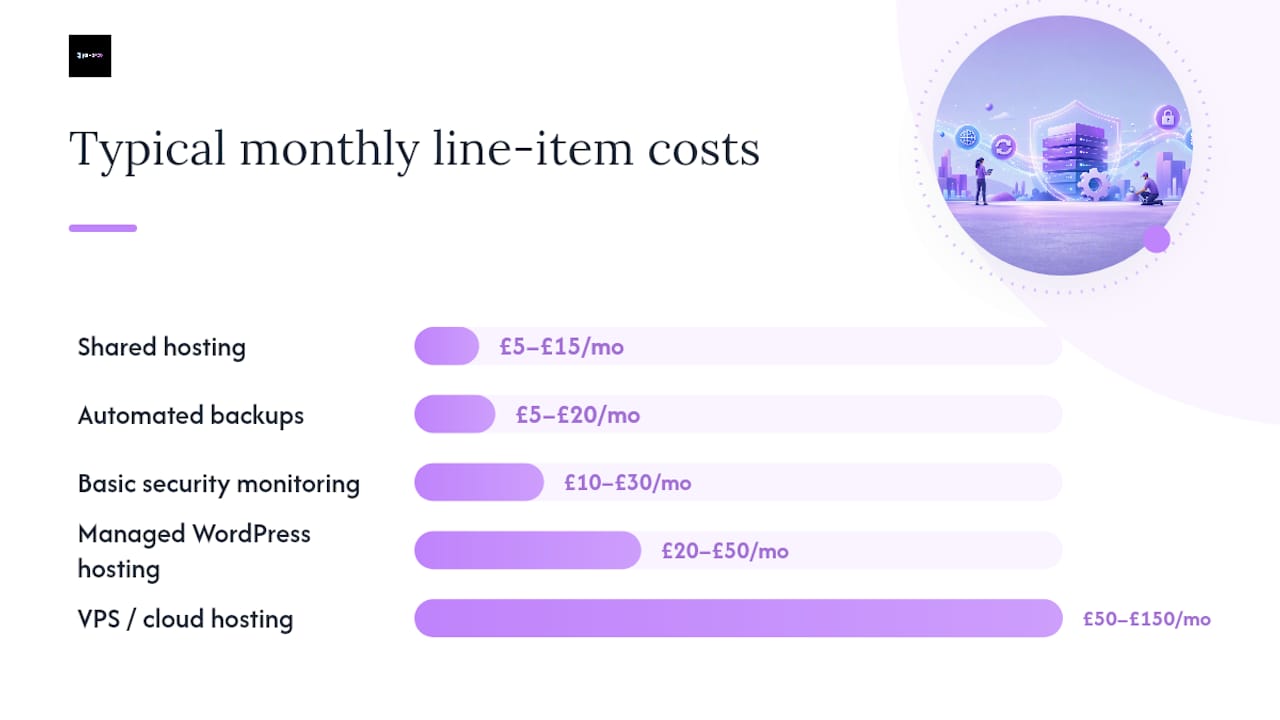
These are pass-through costs. A maintenance provider either bills them separately or bundles them into the retainer. Always ask which applies.
Two example calculations
Brochure site on a managed plan Managed WordPress hosting (£30/month) + backups and monitoring (£15/month) + retainer labour for updates and small edits (£60/month) = £105/month, or £1,260/year.

Small WooCommerce store Cloud hosting (£70/month) + backups and security (£25/month) + plugin governance, testing, and monthly edits (£120/month) = £215/month, or £2,580/year.
Neither example includes content creation, SEO, or development work. Those are add-ons.
Pro Tip: Ask your provider to split the invoice between pass-through costs (hosting, licences) and labour. It makes it far easier to switch providers later without losing your hosting account or domain.
What does website maintenance actually include?
A genuine maintenance package covers six core areas. If a quote is missing any of them, ask why.
Core inclusions:
- Hosting management — server uptime, performance tuning, and renewals handled on your behalf
- CMS and plugin updates — applied and tested, not just triggered automatically
- Backups — daily or weekly, stored off-server, with a tested restore process
- Security monitoring — malware scanning, firewall rules, and alerts for suspicious activity
- Uptime monitoring — automated checks that alert the provider if your site goes down
- Minor content edits — typically 1–2 hours per month; text changes, image swaps, small page updates
Common add-ons billed separately:
- Content creation and copywriting (see website copywriting costs for typical UK rates)
- Large design changes or new page builds
- SEO campaigns and reporting
- Conversion rate optimisation
- Custom development or integrations
The line between a "minor edit" and a "chargeable change" is where disputes happen. Before you sign anything, get a written definition of what counts as a minor change and how additional hours are authorised and billed.
What separates a real maintenance plan from a basic hosting resell is a staging environment. Any provider applying updates directly to your live site without testing on a staging copy first is taking a risk with your business. A staging environment lets changes be tested before they go live — it is a non-negotiable for any site that generates leads or revenue.
SLA examples to look for:
- Uptime monitoring: alerts within 5 minutes of downtime
- Emergency response: within 4 hours for business-critical issues
- Routine updates: applied within 5 working days of release
- Minor edit turnaround: 2–5 working days
What do the pricing tiers actually buy you?
Red Evolution's market summary puts basic management at £50–£300 per month and comprehensive services at £500 per month and above. Here is what sits inside those bands.
| Tier | Monthly range | What you get |
|---|---|---|
| Budget / automation-only | £20–£30 | Scheduled updates, basic hosting, no human testing, no SLA |
| Managed / SME | £50–£300 | Human-checked updates, backups, monitoring, minor edits, email support |
| Growth / full-service | £300–£600 | All managed services plus SEO, content, dev hours, 24/7 support, reporting |
Budget tier risks:
- Updates applied without compatibility testing
- No staging environment
- No named contact; support is ticket-only with long response windows
- Security incidents handled reactively, not proactively
Managed SME tier — what good looks like:
- Updates tested on staging before going live
- Monthly backup verification (not just scheduled, but confirmed working)
- Uptime monitoring with a human notified on alert
- 1–2 hours of minor edits included
- Clear SLA with named response times
Growth tier added value:
- Monthly SEO reporting and technical fixes
- Core Web Vitals monitoring (Google's page speed benchmarks directly affect search rankings)
- Dedicated development hours for new features
- Priority support, often with a 1-hour emergency response window
- Content scheduling and social media integration
The growth tier is not maintenance in the traditional sense; it is a digital operations retainer. For businesses where the website is the primary lead source, it often pays for itself.
How much should you budget by website type?
Your site type is the single biggest predictor of where your costs land. Nine Stones' UK pricing analysis confirms that price scatter across the market is wide — the same job can justify very different quotes depending on scope and SLA.
| Website type | Monthly range | Annual estimate |
|---|---|---|
| Brochure site (5–10 pages) | £50–£150 | £600–£1,800 |
| Portfolio or membership site | £75–£200 | £900–£2,580 |
| Small e-commerce (under 500 products) | £150–£400 | £1,800–£3,600 |
| Large e-commerce (500+ products, integrations) | £400–£600 | £3,600–£18,000 |
| Bespoke or enterprise build | £500–£3,000+ | £6,000–£36,000 |
What shifts the band upward:
- High traffic volumes requiring more robust hosting
- Payment gateway and third-party API integrations (each adds a failure point to monitor)
- Revenue dependency — if the site going down costs you money directly, your SLA needs to reflect that
- Compliance requirements (GDPR data handling, PCI DSS for card payments)
For a small business brochure site, the lower end of the range is realistic if the site is simple and traffic is modest. A small Shopify or WooCommerce store should not budget below £150 per month if it wants genuine oversight rather than automated updates.
Why do WordPress sites often cost more to maintain?
WordPress powers a large share of UK business websites, and it has specific maintenance demands that other platforms do not. Sucuri's website threat reporting identifies outdated CMS software and unpatched plugins as primary drivers of website compromise. That risk is not theoretical — it is the reason WordPress maintenance costs more than maintaining a simpler hosted platform.
WordPress-specific services that add to the bill:
- Plugin governance — reviewing, updating, and occasionally replacing plugins that become abandoned or incompatible
- Theme updates — especially for custom or premium themes that need manual testing after each update
- Staging and rollback — a staging copy of the site for safe testing, plus the ability to roll back if an update breaks something
- Database optimisation — clearing post revisions, spam comments, and transient data that accumulate over time
- Compatibility testing — checking that plugins, themes, and PHP versions work together after any update
Cheap automatic update services are one of the most common causes of WordPress site breakages. An update that conflicts with another plugin can take a site offline in seconds. Without a staging environment and a human checking the result, you may not know until a customer tells you — or until you lose a day's enquiries.
The importance of routine site maintenance goes beyond security patches. Performance, compatibility, and data integrity all depend on regular, tested upkeep. For WordPress specifically, that work is not optional.
What makes one quote higher than another?
Price differences between providers are almost always explained by scope and SLA, not by one agency being greedy and another being generous. GoDaddy's UK small-business guidance notes that ongoing maintenance fees can range from a few hundred to several thousand pounds per year depending on the level of service — and that range is legitimate.
The main cost drivers:
- Site complexity — more pages, more plugins, more integrations mean more to test and monitor
- Traffic volume — high-traffic sites need more robust hosting and faster incident response
- Revenue dependency — a site that processes orders or bookings needs a tighter SLA than a brochure site
- Security and compliance — PCI DSS, GDPR data handling, or sector-specific requirements add audit and monitoring work
- Platform — WordPress and bespoke builds cost more to maintain than hosted platforms like Shopify, where the platform handles core updates
- Response time SLA — a 1-hour emergency response costs more to staff than a next-business-day response
- Geographic working hours — UK business-hours support is cheaper than 24/7 on-call coverage
For Shopify sites, the platform manages core security and hosting, so maintenance costs tend to be lower — typically app governance, theme updates, and content edits rather than server management. Bespoke builds sit at the opposite end: every layer of the stack is your responsibility.
DIY versus hiring a professional: what does each actually cost?
DIY maintenance is not free. It costs time, and time has a value. If you spend three hours per month on updates, testing, and backups, and your time is worth £50 per hour, that is £150 per month in opportunity cost — before accounting for the risk of getting something wrong.
Realistic DIY time per month for a WordPress brochure site:
- Plugin and theme updates with basic testing: 1–2 hours
- Backup verification: 30 minutes
- Security scan review: 30 minutes
- Minor content edits: 1 hour
- Total: roughly 3–4 hours per month
A security incident or a broken update can add 8–20 hours of recovery time. The real cost of site downtime for a UK business includes lost leads, damaged search rankings, and customer trust — none of which appear on a maintenance invoice but all of which are real.
| Model | Monthly cost | Pros | Cons |
|---|---|---|---|
| DIY | £10–£30 (tools/hosting only) | Full control, lowest cash cost | Time-intensive, high risk if something breaks |
| Freelance pay-as-you-go | £50–£150 per session | Flexible, no contract | No proactive monitoring, reactive only |
| Agency retainer | £75–£500+ | Proactive, SLA-backed, tested updates | Fixed monthly cost, requires a good brief |
Example costs for a small brochure site:
- DIY: £15/month hosting + £20/month security plugin = £35/month, plus 3–4 hours of your time
- Freelance: £80–£120 per monthly session, no monitoring between sessions
- Agency retainer: £100–£150/month, includes hosting, monitoring, updates, and minor edits
Example costs for a small e-commerce site:
- DIY: £50–£80/month in tools and hosting, plus 6–8 hours of your time, plus payment gateway compliance risk
- Freelance: £150–£250 per session, no SLA
- Agency retainer: £200–£400/month, includes all of the above with a defined response time
For any site that takes payments or generates regular leads, a retainer with a clear SLA is the lower-risk option. The best web design agencies for UK SMEs typically offer maintenance retainers alongside their build work, which makes handover and ongoing support much cleaner.
How do you choose a website maintenance provider?
The right provider is not the cheapest or the most expensive. It is the one whose scope matches your needs and whose SLA you can hold them to.
Procurement checklist:
- Define what your site needs: platform, traffic level, revenue dependency, compliance requirements
- Ask whether updates are applied to a staging environment before going live
- Confirm what monitoring is included: uptime, security, performance
- Get the backup schedule in writing, and ask how a restore is triggered and how long it takes
- Ask for the SLA in plain language: response times for emergencies, routine updates, and minor edits
- Clarify how many hours of edits are included and how additional hours are authorised and billed
- Ask what pass-through costs (hosting, licences, security tools) are included versus billed separately
- Check whether there is a named contact or whether support goes to a generic ticket queue
Exact questions to ask on a quote:
- "What is your response time for a site that has gone down?"
- "How do you test updates before applying them to the live site?"
- "What happens if an update breaks something — what is the rollback process and how long does it take?"
- "What counts as a minor content change, and what triggers an additional charge?"
- "Are hosting and domain costs included in this fee, or billed separately?"
Red flags to walk away from:
- No mention of a staging environment
- Vague scope ("we'll keep your site running")
- Automation-only language with no human oversight mentioned
- No named contact or account manager
- No written SLA or response time commitments
- Pricing that seems too low to cover real human labour
Pro Tip: Ask for a sample monthly report. A good provider sends a brief summary of what was updated, what was backed up, and whether any issues were flagged. If they cannot show you an example, they probably do not produce one.
Sample budgets and contract types
Here are three ready-to-use monthly budgets you can take into a supplier conversation.
Budget 1 — Basic brochure site (£75–£100/month)
- Managed hosting included
- Monthly plugin and theme updates (staging-tested)
- Daily backups with off-server storage
- Uptime monitoring
- 1 hour of minor content edits
- Email support, 2-business-day response
Annual total: £900–£1,200
Budget 2 — Standard SME site (£150–£250/month)
- Everything in Budget 1
- Security monitoring and malware scanning
- Monthly performance check (Core Web Vitals)
- 2 hours of minor edits
- Priority email support, next-business-day response
Annual total: £1,800–£3,000
Budget 3 — Growth or e-commerce site (£300–£600/month)
- Everything in Budget 2
- WooCommerce or Shopify app governance
- Monthly SEO health check and reporting
- 4 hours of development or content edits
- Phone and email support, 4-hour emergency response
Annual total: £3,600–£7,200
Contract types explained
Rolling monthly — no minimum term, cancel with 30 days' notice. Higher monthly rate, lower commitment. Good for testing a new provider.
Minimum-term retainer — typically 6 or 12 months, often at a lower monthly rate. Notice periods are usually 30–60 days after the minimum term. Better value if you are confident in the provider.
Hourly emergency support — no retainer; you pay per hour when something goes wrong. Rates typically run £60–£150 per hour for UK agencies. Reactive only, no proactive monitoring.
Typical task turnaround times:
- Plugin update cycle: weekly or fortnightly, applied within 5 working days of release
- Minor content change: 2–5 working days
- Emergency response (site down): 1–4 hours depending on SLA tier
- New page or design change: quoted separately, typically 3–10 working days
How we calculated these figures
The price bands in this guide come from three primary sources: published UK agency pricing pages, market surveys and pricing guides produced by UK web industry commentators, and Jarvisandco's own experience pricing and delivering maintenance retainers for UK SMEs.
Sources and assumptions:
- WebPulseLab's 2026 pricing guide provided small-business and e-commerce band data (£29–£100/month and £150–£600/month respectively)
- DevsTree's UK cost breakdown supplied line-item baseline costs for domain, hosting, SSL, and backups
- GoDaddy's UK small-business guide provided commentary on the separation of build fees from ongoing maintenance
Assumptions used:
- Brochure site: 5–15 pages, WordPress or similar CMS, UK shared or managed hosting, modest traffic
- Small e-commerce: under 500 products, WooCommerce or Shopify, payment gateway integration
- Large e-commerce: 500+ products, multiple integrations, higher traffic, tighter SLA requirement
- All figures are in GBP and reflect UK market rates as of 2026; actual quotes will vary by provider, location, and scope
These figures are market bands, not fixed prices. A quote that falls outside a band is not automatically wrong — it may reflect a tighter SLA, a more complex site, or a more experienced team. Judge every quote against its scope, not against another quote.
An honest view on what the numbers actually mean
There is a pattern worth naming. Many UK business owners treat website maintenance as a grudge purchase — something they pay for reluctantly and cut first when budgets tighten. That instinct is understandable, but it tends to produce the worst possible outcome: a site that runs fine for months, then fails catastrophically at the worst moment.
The businesses that get the most from a maintenance retainer are the ones that treat it like business insurance with an active benefit. They use the included edit hours. They read the monthly report. They ask their provider about performance issues before Google notices them. The retainer becomes a working relationship rather than a direct debit they forget about.
The other thing worth saying plainly: the gap between a £75/month managed plan and a £30/month automation-only plan is not £45. It is the difference between someone checking that your site still works after an update and a script that does not. For a site that generates enquiries or revenue, that gap is worth far more than £45 per month.
Jarvisandco's managed website maintenance for UK SMEs
Jarvisandco works with UK small and medium businesses that want their website looked after properly, without paying enterprise prices or signing up to vague contracts.

A typical SME plan from Jarvisandco includes managed hosting, daily backups, staging-tested updates, uptime and security monitoring, and a monthly allowance of content edits. Everything is handled by the same team that built your site, so there is no handover risk and no explaining your setup from scratch.
If you are ready to stop worrying about whether your site is up to date and secure, get in touch with Jarvisandco to discuss a maintenance plan that fits your site and your budget. We will give you a clear scope, a written SLA, and a monthly report so you always know what has been done.
Sources
- Website Maintenance Costs UK 2026: Know Before You Pay - DevsTree UK
- Website Maintenance Cost 2026: Full Pricing Guide | WebPulseLab