A website maintenance plan is a recurring service that keeps your live site secure, backed up, fast, and aligned with what your business needs it to do. For UK SMEs, budgets typically range from around £20 to £100 a month for basic managed care, £100 to £400 for mid-tier support with regular updates, and £400 to £2,000+ for a fully managed retainer with priority response.
Whatever tier you choose, three things need covering from day one:
- Backups that run automatically and get tested, not just stored
- Security and updates applied on a set schedule, not "when someone remembers"
- Uptime monitoring that alerts a real person the moment your site goes down
Key Takeaways
A website maintenance plan works because it combines backups, security, monitoring, and performance care into one accountable, scheduled service rather than leaving your site to chance.
| Point | Details |
|---|---|
| Cover the basics first | Every plan needs daily backups, security updates, and uptime monitoring at minimum. |
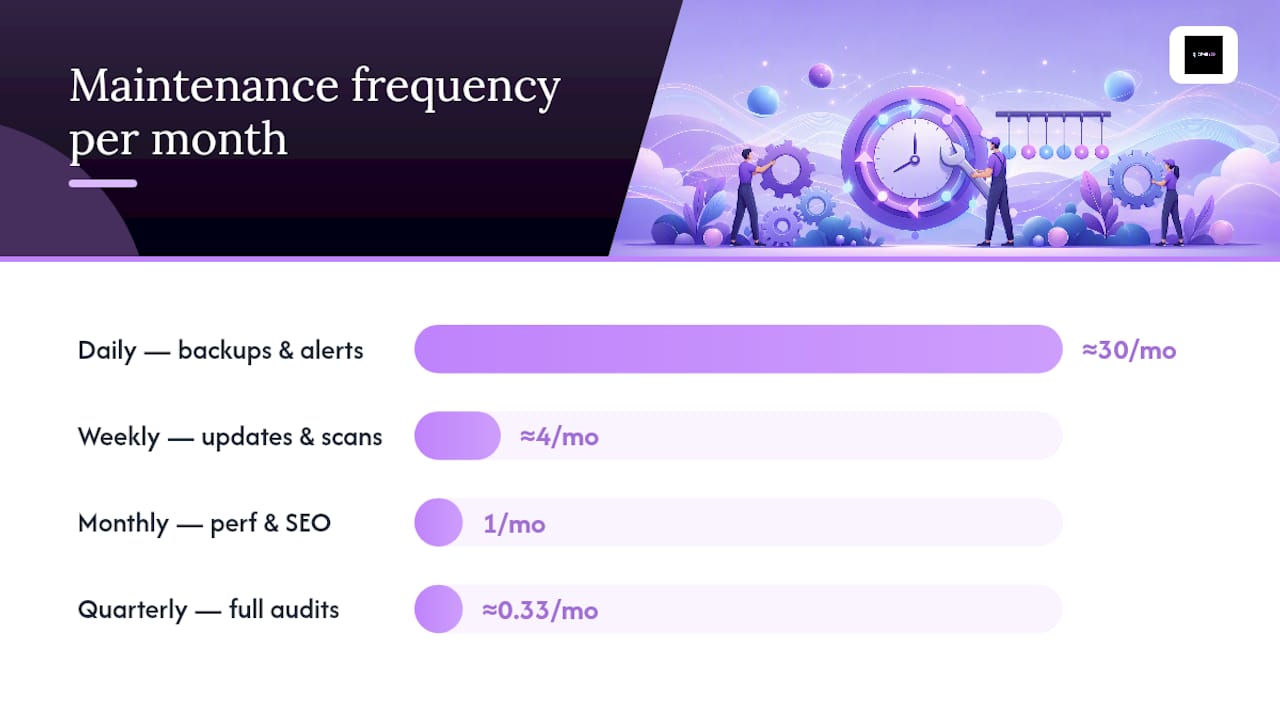
| Match frequency to risk | Daily monitoring, weekly scans, monthly performance checks, and quarterly audits and restore tests. |
| Budget realistically | UK SME plans commonly range from £20 to £2,000+ a month depending on complexity and response time. |
| Demand proof, not promises | Backup logs, changelogs, and scan reports confirm work happened; vague emails don't. |
| Jarvisandco offers tailored SME plans | Includes proof-based monthly reporting, priority support, and flexible change hours for growing sites. |
Table of Contents
- What does a website maintenance plan actually cover?
- The core components every plan should include
- How often should each maintenance task happen?
- What does a maintenance plan typically cost?
- How do you choose a maintenance provider?
- Three sample plans for small businesses
- Does every website need a maintenance plan?
- A copyable maintenance checklist you can start using today
- How Jarvis & Co keeps your site running properly
- Frequently asked questions
- Sources
What does a website maintenance plan actually cover?
At its core, a plan bundles security scans, backups, software updates, performance checks, content edits, and SEO health reviews into one ongoing service. The exact mix depends on which delivery model you're buying.
Most providers offer one of three models:
- Monitoring-only: you get alerts when something breaks, but you fix it yourself or call someone else in
- Maintenance plus support: monitoring bundled with a set bank of hours for updates, fixes, and small content changes
- Fully managed retainer: everything above, plus proactive optimisation and a named point of contact
Don't confuse this with hosting. Hosting is the server your site lives on. A maintenance plan for small businesses is the ongoing care that keeps what's on that server working properly. Many hosting packages include neither backups you can trust nor anyone watching for problems.
The core components every plan should include
Before signing anything, check the plan covers these tasks and that each one has a clear definition of "done":
- Automated backups with restore tests: a backup nobody has tried restoring isn't a backup, it's a guess
- CMS, plugin, and theme updates: applied on schedule, not left to pile up until something breaks
- Security scans and malware removal: checked against known vulnerability categories, not just a generic virus sweep
- Uptime monitoring: real-time alerts, ideally with a response time attached
- Performance optimisation: image compression, caching, and load-time checks
- Broken-link checks: dead links damage both user trust and search rankings
- Form and payment testing: your contact form and checkout should be tested, not assumed to work
- Analytics review: catching traffic drops or anomalies before they become a pattern
- Accessibility checks: spot-checking against WCAG standards
- SSL and domain monitoring: nobody wants a browser security warning greeting their customers
Cyber incidents carry real financial consequences, and Harvard Business Review's analysis of breach costs is a useful reminder that security tasks aren't optional extras on this list.
Pro Tip: Ask your provider for proof of work, not status updates. A backup log, an update changelog, or a security scan summary tells you something actually happened. "All done, no issues!" tells you nothing.

How often should each maintenance task happen?
Frequency matters as much as scope. A well-structured schedule removes ambiguity about who does what and when.
| Frequency | Tasks |
|---|---|
| Daily | Uptime monitoring, automated backups, critical security alerts, basic form checks |
| Weekly | Safe software and plugin updates, security scans, form and payment tests, analytics review |
| Monthly | Performance and speed optimisation, broken-link checks, database clean-up, quick SEO health review |
| Quarterly | Full performance audit, cross-browser and device checks, restore testing, content accuracy and accessibility spot-checks |
A few points worth flagging:
- Not every update should go live immediately. Major plugin or CMS updates often warrant a staging test first.
- Restore testing quarterly, minimum, confirms your backups actually work when you need them.
- Monthly SEO checks catch small drops before they become ranking losses, particularly if you've made recent content or copy changes.
What does a maintenance plan typically cost?
Providers usually charge one of four ways: a fixed monthly retainer, tiered packages with set inclusions, pay-as-you-go hourly support, or a base fee plus emergency call-out charges.
For UK SMEs, realistic monthly ranges look something like this. DIY tooling (backup plugins, a monitoring service) can cost next to nothing beyond your own time. Basic managed plans commonly start around £20 to £100 a month. Mid-tier managed support with regular updates and a small hours bank runs from roughly £100 to £400. Fully managed, priority-response retainers can range from £400 up to £2,000 or more, depending on complexity, which broadly mirrors the DIY-to-professional cost spread seen across the market.
What pushes the price up or down:
- Site complexity: a five-page brochure site costs far less to maintain than a multi-location booking platform
- E-commerce or transactional features: payment processing and stock integrations add ongoing risk and testing needs
- Content change frequency: weekly blog posts and offers need more hands-on support than a static site
- Required response time: a two-hour SLA costs more than a two-day one
- Third-party integrations: CRMs, booking tools, and marketing platforms all add points of failure
Each 0.1% improvement in uptime can protect thousands of pounds in revenue for a transactional site, which is worth remembering when a cheaper quote looks tempting.
How do you choose a maintenance provider?
Start with a checklist. A credible provider should offer:
- A clear SLA with stated response times, not "we'll get to it soon"
- A defined bank of included hours or a transparent hourly rate for extra work
- A documented backup and restore policy, tested on a schedule
- A software update policy that specifies what's covered and how often
- Access to a staging or test environment before changes go live
- Monthly reporting with genuine proof of work attached
- Clarity on security liability and whether they carry insurance
- References or case studies from businesses similar to yours
When you speak to a shortlist, ask directly: What's your exact response time during an outage? What's your target time to restore service (MTTR)? What do "updates" actually include? How are backups stored, and when did you last test a restore? Can I see a sample monthly report?
Watch for red flags: vague "all done" emails with no detail, no evidence of backup or restore testing, no written SLA, no fixed response window, or unclear ownership of your own site credentials and domain. If a provider can't tell you who technically owns access to your site, walk away.
Three sample plans for small businesses
Entry plan (roughly £20 to £75/month): daily backups, uptime monitoring, monthly updates, and a brief monthly report. Fits a simple brochure site with low change frequency.
Business plan (roughly £100 to £300/month): weekly updates, monthly performance work, a small monthly hours bank for content edits, and quarterly audits. Fits a growing SME site with regular content updates and some lead generation reliance, similar to what's covered in SEO-friendly web design practices.
Fully managed plan (£400+/month): daily security monitoring, a priority-response SLA, proactive optimisation, a larger monthly change allowance, and regular restore testing. Fits e-commerce, booking platforms, or any site where downtime directly costs sales.
Does every website need a maintenance plan?
Hosting keeps your site online; maintenance keeps it healthy, secure, and current. Not every site needs the same intensity. E-commerce, booking systems, and high-traffic lead generation sites need tighter, faster-response plans, while a simple brochure site can often manage with baseline backups, monthly updates, and basic monitoring. Even the simplest site still needs those three basics covered.
A copyable maintenance checklist you can start using today
Owners often assume maintenance is a one-off job done at launch. It isn't. Modern, dynamic sites need ongoing, proactive attention to avoid outages and security gaps.
Follow a 3-2-1 backup approach: three copies of your data, on two different storage types, with one stored offsite. Test the restore quarterly at minimum.
Pro Tip: Separate "monitoring" from "support" in your contract. Monitoring tells you something's wrong. Support fixes it. Make sure your plan includes a defined bank of hours or an SLA for actually resolving issues, not just spotting them.
Why proof of work matters more than a monthly invoice
Prevention is cheaper than recovery, every time. Businesses that treat maintenance as disaster prevention, rather than a discretionary line item, tend to avoid the costly scramble that follows a breach or an outage. Downtime doesn't just cost the hours it lasts. It costs the customers who tried, failed, and went elsewhere.
How Jarvis & Co keeps your site running properly
Jarvisandco offers a maintenance approach built specifically for SMEs who don't have an in-house web team, focused on giving you actual evidence your site is being looked after rather than a monthly invoice and silence.

Our maintenance work includes plan setup tailored to your platform, monthly reports with genuine proof (backup logs, update summaries, security scan results), priority support options for businesses that can't afford downtime, and a flexible bank of hours for content and design changes as your business evolves. If you run a trades business relying on local search visibility or an e-commerce store where five minutes offline costs real money, the level of care your site gets should match what's at stake.
If you're unsure whether your current setup covers the basics, get a website audit or quote from Jarvisandco and find out exactly where the gaps are.
Frequently asked questions
What is website maintenance, in simple terms? It's the ongoing work that keeps a live site secure, backed up, fast, and functioning, covering everything from software updates to broken-link fixes.
Is a maintenance plan the same as web hosting? No. Hosting is the server your site sits on. A maintenance plan is the active care and support layered on top of that hosting.
How much does a website maintenance plan cost for a small business? UK SMEs typically pay between £20 and £400 a month for basic to mid-tier managed plans, with fully managed retainers reaching £400 to £2,000+ for complex or transactional sites.
Do I need a maintenance plan if my site rarely changes? Even static sites need baseline backups, security updates, and uptime monitoring. The stakes are lower, but the risk of a breach or outage never disappears entirely.
What should I ask a provider before signing up? Ask for their exact response time during outages, their restore time target, what "updates" specifically cover, how backups are tested, and a sample monthly report.
Sources
- Website Maintenance Plans: Checklist, Tools, ROI & Cost Breakdown (2026)
- Website maintenance 101: Everything you need to know to get started | Webflow Blog
- What Is Website Maintenance? 11 Tasks to Keep Your Site in Tip-Top Shape | HubSpot
- The devastating business impacts of a cyber breach | Harvard Business Review
- OWASP Top Ten