
A correctly planned migration, built on one-to-one 301 redirects, staged testing and a monitored roll-out, is the most reliable way to protect your organic rankings and often improve them. Before you touch a single DNS record, you need three things in place: a GA4 baseline snapshot, a Google Search Console export of your top queries and pages, and a full URL inventory from Screaming Frog. Get those three artefacts right and you have a safety net for everything that follows.
Here is what to action or assign within the next 24 hours:
- Export your top 500 URLs from Screaming Frog (status code, title, meta description, canonical, inbound links).
- Pull a 90-day performance report from Google Search Console: queries, pages, impressions, clicks, average position.
- Take a GA4 baseline: organic sessions, bounce rate, goal completions, and revenue if applicable.
- Check whether the Change of Address tool applies to your migration (it works only for domain-level moves and requires verified ownership of both properties).
- Confirm your rollback plan is documented and that a named person owns it.
- Book a staging environment before any code changes touch production.
Pro Tip: Set up a shared spreadsheet now with columns for old URL, new URL, redirect rule, status code, priority, and verification status. Filling it in as you go is far easier than reconstructing it under pressure on launch day.
Key takeaways
A correctly executed website migration, built on one-to-one 301 redirects, staged testing and continuous post-launch monitoring, is the most reliable way to protect and often improve your organic search performance.
| Point | Details |
|---|---|
| Baseline before you build | Export GA4 and Search Console data for 90 days before touching any code or DNS settings. |
| One-to-one 301 redirects | Map every old URL to its closest new equivalent; never bulk-redirect to the homepage. |
| Staging environment checks | Block public indexing on staging and verify metadata, canonicals, hreflang, and schema before launch. |
| Launch-day sequence | Follow an ordered checklist in the first hour: DNS, redirects, robots.txt, sitemap, Search Console, GA4. |
| Monitor for 90 days | Track indexed pages, organic sessions, rankings, and crawl errors daily in week one, then weekly. |
| Jarvisandco migration support | Jarvisandco delivers end-to-end UK migration projects: audit, redirect mapping, staging validation, and 90-day monitoring. |
Table of Contents
- What is a website migration and which types carry the most SEO risk?
- Pre-migration checklist: what to finish before any code or DNS change
- How to build and test your staging environment before launch
- URL mapping and 301 redirect strategy: how to build and deploy it correctly
- Technical SEO tasks to complete during the migration
- Launch day: the exact sequence to follow in the first six hours
- Post-migration monitoring: what to track in the first 30–90 days
- Common migration mistakes and what to do if things go wrong
- Which tools should you use for a website migration?
- Jarvis & Co's practical perspective on SEO-safe migrations
- How Jarvisandco can support your migration from start to finish
- Primary sources and further reading
- Sources
What is a website migration and which types carry the most SEO risk?
A website migration is any change to a site's structure, domain, platform, or technical configuration that has the potential to affect how search engines crawl, index, and rank its pages. That definition covers a wide range of projects, and the SEO risk varies considerably depending on what you are changing.
Migration types and their relative SEO risk:
- Domain change (e.g. old-brand.co.uk to new-brand.co.uk): highest risk. Every URL changes, all backlink equity must be transferred via redirects, and Google treats the new domain as unfamiliar. Recovery can take months even when redirects are perfect.
- Subdomain change (e.g. blog.site.com to site.com/blog): high risk. Google treats subdomains as separate entities, so consolidation or separation affects how link equity is distributed.
- CMS or platform replatform (e.g. WordPress to Shopify, or a bespoke rebuild): medium to high risk. URLs often change, templates change, and metadata can be lost silently during data export.
- Redesign with URL changes: medium to high risk. Even a cosmetic redesign that alters URL slugs or removes pages creates redirect requirements.
- Structural reorganisation (e.g. flattening category hierarchies): medium risk. Internal linking, canonical tags, and breadcrumb schema all need updating.
- HTTP to HTTPS migration: low to medium risk when done correctly. Canonicals, mixed-content warnings, and redirect chains are the main failure points.
- Hosting or server move (same domain, same URLs): low risk, but Core Web Vitals, uptime, and crawl budget can be affected if the new host is slower or misconfigured.
- Content consolidation (merging multiple sites or sections): medium to high risk depending on the volume of URLs being retired.
The signals that change most frequently across these types are URLs, internal links, canonical tags, hreflang attributes, and structured data markup. Each one needs a dedicated check in your migration plan.
Pre-migration checklist: what to finish before any code or DNS change
The most important pre-move tasks are establishing your baselines, inventorying every URL, and getting formal sign-off before anyone touches production. A thorough pre-migration crawl and a complete redirect map are the two artefacts most often missing when migrations go wrong.
Baseline metrics and analytics exports
- GA4: export organic sessions, landing pages, goal completions, and e-commerce revenue (if applicable) for the last 90 days and the same period the previous year.
- Google Search Console: export queries, pages, impressions, clicks, and average position. Download the full URL list from the Coverage report.
- Backlink inventory: use Semrush or Ahrefs to export your top referring domains and the specific URLs they link to. These are your highest-priority redirect targets.
- Server logs: if you have access, pull 30 days of server logs to identify which URLs Googlebot crawls most frequently. These are your highest-value crawl paths.
- Screaming Frog crawl: run a full crawl of the live site and export every URL with its status code, title tag, meta description, H1, canonical, word count, and inbound internal links.
URL inventory template
Every URL you discover should go into a single spreadsheet. The columns below are the minimum you need:
| Column | What to record |
|---|---|
| Old URL | Full absolute URL of the existing page |
| HTTP status | Current status code (200, 301, 404, etc.) |
| Organic sessions (90 days) | From GA4 |
| Referring domains | Count from Semrush or Ahrefs |
| Canonical tag | Current canonical value |
| New URL target | Where this URL should redirect or resolve |
| Redirect rule | 301, 308, or retire (no redirect needed) |
| Priority | High / medium / low based on traffic and backlinks |
| Verification status | Not started / mapped / tested / confirmed live |
Stakeholder alignment and rollback plan
Name a single owner for the migration project and get written sign-off from technical, content, and commercial stakeholders before build work begins. Your rollback plan should specify:
- The exact trigger for reverting (e.g. organic sessions drop more than 30% within 48 hours of launch, or more than 20 critical pages return 404).
- Who has authority to call a rollback.
- The technical steps to restore the old DNS, redirects, and site files.
- A communications template for notifying clients, customers, or internal teams.
Pro Tip: Cull low-quality, thin, or duplicate content before the migration, not after. Carrying poor content to a new domain invites a quality re-evaluation from Google at the worst possible moment.
How to build and test your staging environment before launch
Test everything on staging before public cutover. The minimum staging checklist covers indexation blocking, metadata accuracy, analytics firing, and Core Web Vitals. Missing a staging noindex tag is one of the most common causes of large ranking drops because it either leaks the staging site to Google or, more often, carries the noindex directive into production.

Blocking and access control on staging
Your staging environment should be blocked from public indexing via X-Robots-Tag: noindex at the server level, not just in robots.txt. If you need Googlebot to crawl staging for testing purposes, use IP allow-listing or HTTP authentication rather than removing the noindex entirely. Never make staging publicly accessible without a block in place.
Template and metadata verification checklist
Run through these on every page template, not just the homepage:
- Meta titles and descriptions are present, unique, and within recommended lengths.
- Canonical tags point to the correct new URLs (not to staging URLs or old production URLs).
- Hreflang attributes are present and accurate for any international or multilingual pages.
- Structured data (schema.org markup) is present and matches the content type. Validate using Google's Rich Results Test or the Schema.
- GA4 tags are firing correctly on all page types (verify in GA4 DebugView).
- Search Console verification is in place for the new property.
Ordered staging QA steps
- Run a full Screaming Frog crawl of staging and compare it against the production crawl. Flag any missing pages, changed titles, or lost canonicals.
- Check Core Web Vitals using Google PageSpeed Insights or Lighthouse on the five highest-traffic page templates.
- Test all critical conversion paths: contact forms, checkout flows, booking systems.
- Verify that all redirect rules in your .htaccess, Nginx config, or CDN edge functions return the correct status codes on staging.
- Confirm DNS TTL has been lowered to 300 seconds (5 minutes) at least 48 hours before planned cutover, so propagation is fast on launch day.
- Document any third-party service credentials (payment gateways, CRM integrations, live chat) that need updating when the domain changes.
URL mapping and 301 redirect strategy: how to build and deploy it correctly
One-to-one 301 redirects (or 308s for POST requests) are the single most important SEO action in any migration. Google's own guidance recommends server-side permanent redirects, avoiding redirect chains, submitting updated sitemaps, and monitoring indexation as the primary steps for site moves with URL changes. Get this wrong and no amount of post-launch monitoring will fully recover what you lose.
Redirect map sample
Rules for building the map
- Never bulk-redirect to the homepage. Redirecting hundreds of old URLs to your homepage tells Google those pages no longer exist as distinct content. It destroys the equity those pages carried.
- Avoid redirect chains. If /page-a/ already redirects to /page-b/, and /page-b/ now redirects to /page-c/, flatten it to a direct /page-a/ to /page-c/ redirect. Chains dilute PageRank and slow crawling.
- Handle consolidated pages carefully. When merging two pages into one, redirect both old URLs to the single new canonical. Pick the new URL that best matches the combined intent.
- Use 301 for permanent moves. A 302 tells Google the move is temporary and delays signal transfer. Use 302 only for genuine temporary redirects.
- Avoid meta-refresh and JavaScript redirects. Both are slower for Googlebot to process and neither passes equity as reliably as a server-side 301.
Implementation by stack
- Apache / .htaccess: use
RewriteRuledirectives for path-based redirects. - Nginx: use
rewriteorreturn 301directives in the server block. - Cloudflare Workers / Vercel / Fastly: edge-function redirects are fast and scalable for large redirect maps; store the map as a JSON lookup table.
- CMS plugins (WordPress, Shopify): Redirection (WordPress) or built-in URL redirects (Shopify) work for smaller sites but can slow page load at scale.
Verification checklist
- Sample at least 100 URLs from your redirect map and check their status codes using Screaming Frog's List Mode or a bulk HTTP checker.
- Confirm no redirect returns a 302 where a 301 was intended.
- Check that no redirect chain exceeds one hop.
- Verify that the final destination URL returns a 200 status.
Pro Tip: Keep your redirects live for at least 12 months, and ideally indefinitely. Keep the old domain registered and renewing. Letting it lapse means anyone can buy it and point it at a competitor.
Technical SEO tasks to complete during the migration
Correct your robots.txt and sitemap on production before anything else. A robots.txt that blocks Googlebot, or a sitemap pointing to old URLs, will slow re-indexation significantly.
Robots.txt and XML sitemap
- Remove any
Disallow: /or staging-era rules from your production robots.txt immediately after launch. - Generate a fresh XML sitemap containing only canonical, indexable URLs. Exclude redirected, noindexed, and paginated URLs unless you have a specific reason to include them.
- Submit the new sitemap in Google Search Console and request indexing for your highest-priority pages using the URL Inspection tool.
Canonical tags
Every page on the new site should have a self-referencing canonical pointing to its own new URL. Check that no page carries a canonical pointing to the old domain or to a staging URL. This is a common silent failure in CMS migrations where canonical tags are hardcoded in templates.
Hreflang for international and multilingual sites
If your site serves multiple languages or regions, your hreflang attributes need updating to reflect new URLs. Check that:
- Every hreflang tag uses the new absolute URL.
- The x-default tag is present and points to the correct fallback page.
- Hreflang is implemented consistently (either in the
<head>, HTTP headers, or sitemap, not a mix). - Reciprocal hreflang links are present (each page in the set references all others).
HTTPS and canonical consolidation
If you are moving from HTTP to HTTPS as part of the migration, confirm that:
- All internal links use HTTPS URLs.
- The canonical tag uses HTTPS.
- The sitemap uses HTTPS URLs.
- Mixed-content warnings are resolved (check browser console and a tool like Why No Padlock).
Structured data and schema markup
Preserve your schema.org markup during the migration and re-validate it after launch. Common losses include Organisation, LocalBusiness, Product, Article, and BreadcrumbList schemas that are hardcoded in templates and not carried over during a CMS switch. For UK local businesses, local business schema is particularly worth auditing, as it affects local pack eligibility.
Internal links and images
Update all internal link templates to point to new canonical URLs rather than relying on redirects. Redirected internal links waste crawl budget and slow the consolidation of signals. Update image src attributes and alt text where the domain or path has changed, and confirm your CDN is serving assets from the correct new domain.
Pro Tip: Run the schema.org validator on your five most important page types immediately after launch, not just before. CMS deployments frequently strip or corrupt structured data in ways that are invisible until you check.
Launch day: the exact sequence to follow in the first six hours
Execute an ordered checklist in the first hour, then run a broader triage in hours two to six. Speed matters here: the faster you catch a critical error, the less indexation damage it causes.
Ordered launch sequence
- Confirm DNS TTL is at 300 seconds and initiate the DNS cutover.
- Push all redirect rules to the production server or CDN before traffic arrives.
- Swap robots.txt to the production version (no Disallow: / directives).
- Remove any noindex tags that were present on staging.
- Deploy the new XML sitemap and verify it is accessible at /sitemap.xml.
- Submit the sitemap in Google Search Console.
- Use the URL Inspection tool in Search Console to request indexing for the homepage and your top five landing pages.
- If this is a domain move, file the Change of Address tool in Search Console after redirects are confirmed live. The tool forwards signals from the old domain for 180 days and requires verified ownership of both properties. It is supplemental to redirects, not a replacement for them.
- Verify GA4 is recording sessions on the new domain.
- Check that conversion tracking (goals, e-commerce, form submissions) is firing correctly.
Quick triage checklist (hours 2–6)
- Check status codes on 20 high-traffic URLs using Screaming Frog List Mode.
- Manually visit the homepage, top 10 landing pages, and checkout or contact form paths.
- Run URL Inspection in Search Console on a sample of five pages across different templates.
- Check server error logs for 500 errors or unexpected 404 spikes.
- Confirm Core Web Vitals scores have not regressed significantly from staging benchmarks.
Stakeholder communications
Send a brief status update to all stakeholders within the first two hours: confirm launch status, note any issues found, and state the next check-in time. If a critical issue triggers the rollback threshold (e.g.
Post-migration monitoring: what to track in the first 30–90 days
Monitor continuously with a daily checklist for week one, weekly checks for weeks two to twelve, and monthly audits thereafter. A plan to keep traffic and SEO safe requires structured monitoring workflows, not just a one-off post-launch check.
Monitoring schedule and key metrics
Week 1 (daily):
- Indexed page count in Google Search Console Coverage report.
- Organic sessions in GA4 versus the pre-migration baseline.
- Crawl errors and 404 spikes in Search Console.
- Redirect chain reports from Screaming Frog.
- Server uptime and response times.
Weeks 2–12 (weekly):
- Ranking positions for your top 20 commercial keywords (Semrush Position Tracking or Search Console).
- Core Web Vitals field data in Search Console.
- New crawl errors or soft 404s.
- Backlink profile changes in Semrush (check for lost referring domains pointing to old URLs that are not redirecting correctly).
Months 2–3 (monthly):
- Full Screaming Frog re-crawl and comparison against the pre-migration crawl.
- Structured data errors in Search Console's Rich Results report.
- Hreflang errors (for international sites).
- Internal link audit to remove any remaining redirected links.
Troubleshooting flow
If organic traffic drops significantly after launch, work through this sequence:
- Check redirects first. Run a Screaming Frog crawl in List Mode against your full URL inventory. Any URL returning 404 or a redirect chain is a priority fix.
- Check indexation. Is the indexed page count lower than expected? Use the URL Inspection tool and the Coverage report to identify excluded pages.
- Check for template-level metadata loss. Open five pages across different templates and inspect their title tags and canonical tags in the browser source. A CMS deployment can silently overwrite these.
- Check canonical conflicts. Search Console's Duplicate Content report will surface pages where the canonical is pointing somewhere unexpected.
- Check user behaviour. Tools like Microsoft Clarity or Hotjar can reveal UX regressions (rage clicks, dead clicks, high scroll-abandonment) that correlate with conversion drops and may signal page-level issues Google is also detecting.
Pro Tip: Keep a rolling issue log in your project spreadsheet. Record every problem found, its priority (traffic and backlink impact), the fix applied, and the date resolved. This log becomes your evidence base if you need to escalate or explain a traffic dip to a client or stakeholder.
Common migration mistakes and what to do if things go wrong
The mistakes that cause the largest ranking losses are almost always the same ones: missing or misconfigured redirects, a staging noindex carried into production, bulk redirects to the homepage, and failing to keep the old domain registered. Redirect accuracy and completeness are the dominant variables for recovery speed.
Mistakes to avoid
- Missing redirects for high-value pages. Any page with backlinks or organic traffic that goes to 404 loses its equity permanently unless corrected quickly.
- Staging noindex in production. A single
noindexdirective in a template can deindex your entire site within days. Check every template individually. - Bulk redirect to homepage. As noted above, this signals to Google that hundreds of pages have been removed. It is one of the hardest mistakes to recover from.
- Redirect chains. Every additional hop in a chain dilutes the PageRank passed and slows crawling. Flatten all chains to single hops before launch.
- 302 instead of 301. A 302 tells Google the move is temporary. Signal transfer is delayed or incomplete.
- Changing too many things at once. Bundling a domain change, a CMS replatform, a redesign, and a URL restructure into a single release makes it almost impossible to diagnose what caused a traffic drop. Isolate change dimensions where you can.
- Not keeping the old domain registered. If the old domain lapses, anyone can buy it. Backlinks pointing to it will no longer reach your new site.
- Forgetting hreflang on international sites. Lost hreflang means Google may serve the wrong language version to users in different markets, or may treat pages as duplicates.
Rollback plan
Define your rollback triggers before launch. A reasonable set of triggers:
- Organic sessions drop more than 30% within 48 hours of launch (versus the same period the previous week).
- More than 20 high-priority pages return 404 or incorrect status codes.
- A critical conversion path (checkout, contact form) is broken and cannot be fixed within two hours.
When a trigger is hit, the rollback owner should:
- Restore the old DNS records and wait for propagation (TTL should still be at 300 seconds from pre-launch).
- Restore the old site files and redirect rules.
- Notify all stakeholders using the pre-written communications template.
- Document what went wrong and schedule a post-mortem before the next launch attempt.
Pro Tip: Freeze scope before launch. Every additional change added to the migration brief after the redirect map is finalised increases risk. If a stakeholder wants to add a new URL structure or a content refresh, schedule it as a separate project after the migration has stabilised.
Which tools should you use for a website migration?
The highest-value tools for migration work are Screaming Frog, Semrush, Google Search Console, and GA4. Each serves a different phase of the project.
Tool list
- Screaming Frog SEO Spider: the primary crawl tool for URL inventory, metadata audits, redirect chain detection, and post-launch comparison crawls. The free tier crawls up to 500 URLs, which covers most small business sites. The paid licence (£259/year) removes the limit and adds scheduled crawls and JavaScript rendering.
- Semrush: use for backlink audits, keyword ranking tracking, and position monitoring post-launch. The Semrush migration checklist is also a useful reference document. Paid plans start at $139.95/month; the free tier gives limited access.
- Google Search Console: free. Use for URL Inspection, Coverage reports, sitemap submission, Core Web Vitals field data, and the Change of Address tool for domain moves.
- GA4: free. Use for baseline exports, organic session tracking, and conversion monitoring pre and post-launch.
- Microsoft Clarity: free. Use post-launch for session recordings and heatmaps to detect UX regressions that may correlate with ranking or conversion drops.
- Google PageSpeed Insights / Lighthouse: free. Use for Core Web Vitals checks on staging and production.
- Archive.org Wayback Machine: free. Use to recover lost content or verify historical metadata when reconstructing old pages during redirect mapping.
- Google Rich Results Test: free. Use to validate structured data before and after launch.
Templates to prepare
- URL inventory spreadsheet: columns as listed in the pre-migration section above.
- Redirect map: old URL, new URL, redirect type, priority, status (as shown in the redirect map sample above).
- Launch-hour triage checklist: a printed or shared-doc version of the ordered launch sequence and quick triage list above, with named owners for each step.
- Issue log: rolling spreadsheet with columns for issue description, affected URLs, priority, fix applied, and date resolved.
For UK SMEs, the free tiers of Search Console, GA4, Clarity, and Screaming Frog (up to 500 URLs) cover the majority of migration monitoring needs. Screaming Frog's paid licence and a Semrush subscription become worthwhile once your site exceeds 500 pages or you need ongoing rank tracking.
Jarvis & Co's practical perspective on SEO-safe migrations
A migration is not just a technical swap. It is the best opportunity you will have to audit every page on your site, cut what is not working, and rebuild on a cleaner foundation. Most businesses treat it as a deadline to hit rather than a diagnostic to run, and that is where the avoidable losses happen.
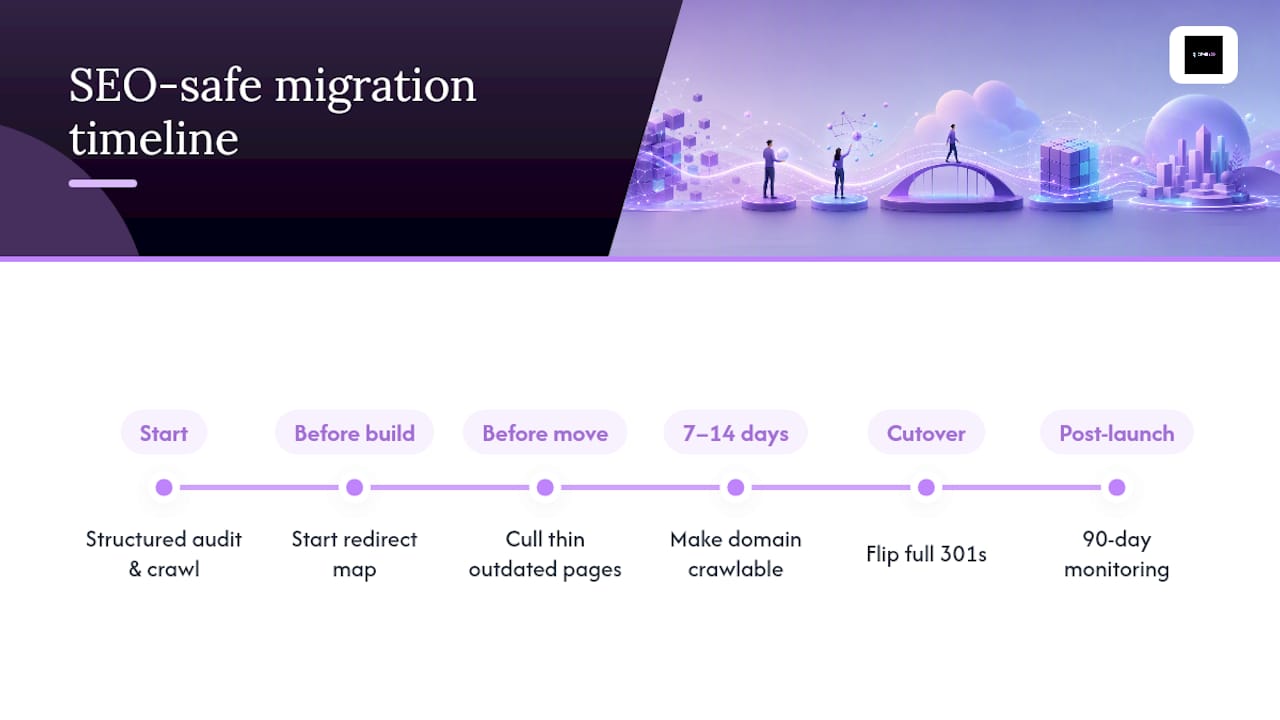
The teams that come through migrations with their rankings intact, or better, are the ones that start the redirect map before the new site is built, not after. They crawl the old site on day one of the project, not day one of the launch week.
The early-launch pattern is worth taking seriously. Making the new domain crawlable 7–14 days before flipping full 301s gives Google time to begin processing the new site without the abrupt signal shift that a same-day cutover creates. It is not universally applicable, but for domain moves it can meaningfully reduce the depth of the initial traffic dip.
The other thing most guides understate is the content cull. Carrying 200 thin, outdated pages to a new domain does not give you a clean slate. It gives Google 200 reasons to re-evaluate your quality signals at the moment you are most vulnerable. Cut before you move.
For businesses that want hands-on support with SEO-friendly web design and migration planning, the combination of a structured audit, a documented redirect map, and a 90-day monitoring period is the delivery model that consistently produces the best outcomes.
How Jarvisandco can support your migration from start to finish
Planning a migration and not sure where to start? Jarvisandco provides end-to-end migration support for UK businesses, covering the full project from pre-launch audit to 90-day post-launch monitoring. You get a documented URL inventory, a complete redirect map, staging environment validation, launch-day support, and a structured monitoring schedule, all delivered by a team that has been building and migrating websites for over 15 years.
The difference between a migration that costs you six months of rankings and one that does not is almost always preparation. Jarvisandco handles the technical groundwork so you can focus on running your business. Whether you are replatforming to Shopify, moving to a new domain, or rebuilding from scratch, we will make sure your SEO signals travel with you.
Get in touch with Jarvisandco to book a migration audit or discovery call. We will review your current site, map the risks, and give you a clear plan before anything goes live.
Primary sources and further reading
The sources below were used to build this guide. Each one is worth reading in full if you want to go deeper on a specific phase of the migration.
- Google Search Console Change of Address tool: the official documentation for filing a domain move in Search Console. Read this before you file, as the tool has specific requirements around property ownership and timing.
- Google Search Central: site moves with URL changes: Google's own guidance on redirect types, sitemap submission, and indexation monitoring. The authoritative source for redirect implementation decisions.
- Semrush website migration checklist: a detailed checklist covering pre-migration, launch, and post-launch phases. Particularly useful for the staging and redirect sections.
- Linkguard.ai site migration SEO checklist (2026): covers the early-launch pattern and pre-migration content cull recommendations. Worth reading if you are planning a domain move.
- Atlas Marketing: website migration SEO guide: useful for setting realistic traffic-recovery expectations by migration type and understanding the role of redirect accuracy in recovery speed.