An internal linking strategy is the deliberate network of links you build between your own pages so crawlers can find everything, authority flows to the pages that need it, and visitors always have a next step. Done properly, it improves crawlability, redistributes link equity, and guides navigation. The first thing to do today is map your pillar pages and hunt down any orphan pages sitting outside that network.
TL;DR:
- Contextual links early in content hold the most SEO value due to first-link priority, making placement within the first two paragraphs crucial.
- Building a pillar-and-cluster site architecture improves crawl efficiency, authority flow, and topical relevance, especially when pages are within three clicks of the homepage.
- Regular audits with tools like Screaming Frog, Semrush, and Google Search Console are essential to identify orphan pages, broken links, and crawl depth issues, which impact indexing and ranking.
- Manual review combined with automation is the optimal approach for internal linking, ensuring relevance and precision while managing high-volume content consistently.
- Internal linking should be an ongoing habit, with pre-publication decisions on relevant links, to prevent pages from becoming orphaned and to sustain long-term site health.
Table of Contents
- What does internal linking do for SEO and user experience?
- What types of internal links carry the most SEO weight?
- How should you structure pillar pages and topic clusters?
- What's the step-by-step process for building an internal linking strategy?
- Which audit checks and tools catch the most internal linking issues?
- How do you measure whether your internal linking is working?
- What checklist does Jarvis & Co use when wiring topic clusters?
- Should you automate internal linking or handle it manually?
- What do real internal linking fixes look like in practice?
- Why internal linking has to be a recurring habit, not a project
- How Jarvis & Co builds internal linking into your site the right way
- Sources
What does internal linking do for SEO and user experience?
Search engines find your content by following links, not by guessing it exists. Google's own developer documentation confirms that crawlers discover and index pages through the links pointing to them, which means a page with no internal links pointing to it, an orphan page, can sit invisible to Google no matter how good the content is. This is the part most site owners get backwards: they assume publishing is enough. It isn't. If nothing on your site links to a page, you're relying entirely on Google finding it some other way, and that's a gamble you don't need to take.
Internal links do a second job beyond discovery. They pass what's often called link equity, a share of the authority a page has earned, through to the pages it links to. A homepage with dozens of external backlinks can lend some of that weight to a service page three clicks deep, provided a link actually exists in that path. Links also tell Google which topics your pages relate to, based on the anchor text and surrounding context, which is how a search engine builds a picture of what your site actually covers.
That picture matters more now than it did five years ago. A consistent internal linking setup increases crawl frequency and helps new pages get noticed faster, and it strengthens the topical authority signals that AI-driven search increasingly relies on. If you want an AI answer engine to cite your guide on a subject, it needs to see clearly that your site has depth on that subject, and internal links are how you demonstrate that depth structurally, not just in your copy.
Internal linking delivers three measurable outcomes:
- Faster discovery and indexing of new pages, because crawlers reach them through existing links rather than waiting for a sitemap crawl.
- Authority redistribution from your strongest pages to the ones you actually want to rank.
- Clearer navigation paths that keep visitors moving towards a conversion rather than bouncing.
Internal linking is also one of the few SEO levers entirely within your control. You can't force other sites to link to you, but you decide, right now, which of your own pages link to which.
What types of internal links carry the most SEO weight?
Not every link on your site pulls equal weight. Search engines and users both treat a link buried in a footer very differently to one placed inside a sentence of genuine editorial content, and your strategy needs to reflect that hierarchy rather than treat all links as interchangeable.
The five link types you'll find on almost any site:
- Contextual (in-body) links sit inside your actual content, surrounded by relevant text. These carry the most weight because the surrounding words give Google context about what the linked page is about.
- Navigational links live in your main menu and structure the site's top-level hierarchy.
- Footer links appear on every page but usually point to secondary content like policy pages or a sitemap.
- Breadcrumb links show the path back to a category or homepage, useful for both users and crawlers.
- Sidebar links often surface related posts or categories, common on blogs and news sites.
Contextual links deserve priority because they're the only type that combines placement with descriptive anchor text and topical relevance in one move. When you publish a new article, look for three to five genuine opportunities to link out to existing pages, and place at least one of those links early in the piece rather than saving everything for a "related articles" list at the end.
That early placement isn't a stylistic preference. It reflects what's known as first-link priority: search engines often treat the first instance of a link on a page as the most significant one, so if the same destination gets linked twice on a page, the first occurrence usually carries more signal than the second.
Navigational, footer, and breadcrumb links matter too, but for a different reason. They keep your site's overall structure intact and make sure every page stays reachable, but they rarely carry unique topical context because the same anchor text and destination repeat identically across hundreds of pages.
Pro Tip: When you update an old post, don't just add a new link at the bottom. Go back through the first two paragraphs and see if a contextual link fits there instead, you'll get more benefit from repositioning an existing link than from bolting on a fresh one nobody reaches.
How should you structure pillar pages and topic clusters?
The most reliable architecture for internal linking is the hub-and-spoke model: one comprehensive pillar page covering a broad topic, surrounded by multiple cluster pages that each tackle a narrower subtopic and link back to the pillar. Get this wiring right and you solve crawl depth, authority flow, and topical relevance in one structural decision.
-
Identify your pillar candidates first. These are usually your highest-value, broadest pages, the ones you'd want to rank for a competitive head term. A guide like a LinkedIn content strategy resource works well as a pillar because it can absorb links from dozens of narrower supporting posts.
-
Build cluster content that links up and across. Every cluster page should link to its pillar using descriptive anchor text, and the pillar should link back down to its clusters. This reciprocal pattern is what actually distinguishes a cluster model from a random pile of blog posts that happen to share a category tag.
-
Keep every page you care about within three clicks of the homepage. This is a genuinely useful rule of thumb, not an arbitrary number: pages more than three clicks deep get crawled less often and found by fewer users, because both crawlers and humans lose patience navigating deep hierarchies. If a page matters commercially, count the clicks from your homepage and shorten the path if it's more than three.
-
Add shortcuts where the natural hierarchy creates too much depth. Sometimes your category structure is logical but still buries a genuinely important page. A homepage banner, a featured link in a navigation menu, or a "popular this month" widget can shortcut that depth without you having to flatten your entire taxonomy. Thinking through homepage design and what gets prioritised there is often the fastest way to solve this.
-
Resist strict siloing. A rigid model where cluster A can never link to cluster B sounds clean on paper, but it often blocks authority from travelling to where it would actually help rankings. A blended approach, clusters that stay organised but allow contextually relevant cross-links between related topics, tends to outperform strict silos in practice, because real content overlaps in ways a rigid taxonomy never anticipates.
The mistake most sites make isn't a lack of structure, it's building the structure once and never revisiting it. New content gets added to whichever category is closest, pillar pages stop getting fresh links, and within a year the clean hub-and-spoke diagram from your planning document bears no resemblance to the actual site. Treat the architecture as something you check quarterly, not something you set once and forget.
What's the step-by-step process for building an internal linking strategy?
Here's the sequence that works whether you're starting from scratch or repairing years of neglect. Follow it in order, because later steps depend on the audit data from earlier ones.
-
Map your site and flag your power pages. List every page that currently earns organic traffic or backlinks, these are your power pages, and note which pillar or cluster each one should belong to. This map becomes the reference point for every linking decision you make afterwards.
-
Run a full audit before touching anything. You need to know your orphan pages, broken internal links, and redirect chains before you start adding new links, otherwise you're building on top of a broken foundation. Reliable audit sources recommend treating this as the mandatory first step, not an optional extra.
-
Add contextual links to new and existing content. Aim for three to five per new article, placed with descriptive anchor text and at least one early in the piece to benefit from first-link priority.
-
Route authority through your strongest pages deliberately. Don't spread links evenly across every page you own. Identify the two or three pages with the most external backlinks or organic traffic and make sure they link out to the pages you most want to rank, while avoiding link dilution by not adding links purely for the sake of hitting a quota.
-
Fix every redirect and broken link the audit surfaced. Internal links should point straight to the final HTTPS destination, never through a redirect chain, and never to an old HTTP version of a page you've since secured.
-
Add navigational shortcuts for deep but important pages. If step one revealed a commercially important page sitting five clicks from the homepage, give it a shortcut rather than waiting for a full restructure.
-
Document every change and note the date. You'll need this later when you're trying to work out whether a traffic shift came from your linking changes or something else entirely.
-
Schedule a recurring review. Internal linking isn't a project with an end date; new content keeps creating new orphan pages and new linking opportunities.
Quick reference for what "good" looks like at each stage:
- Every new article links to at least one existing pillar or cluster page.
- No page sits more than three clicks from the homepage without a documented reason.
- Zero internal links route through a redirect chain.
- Anchor text describes the destination rather than repeating "click here" or "read more".
This sequence works because each step feeds the next: without the audit in step two, step four is guesswork, and without documentation in step seven, step eight becomes impossible to prioritise properly.
Which audit checks and tools catch the most internal linking issues?
Three tools cover almost everything you need, and each one surfaces problems the others miss.
Screaming Frog is the tool for a granular technical crawl. Run the internal links report to see every link on the site with its source and destination, check response codes to catch 404s and server errors, and pull the redirect chains report specifically, because a chain of two or three redirects in sequence quietly bleeds equity at every hop.
Semrush's Site Audit module adds the reporting layer Screaming Frog doesn't prioritise as clearly. The orphan pages panel flags content with zero internal links pointing to it, the crawl depth report shows exactly how many clicks separate every page from the homepage, and the internal link distribution view highlights which pages are hoarding links while others go untouched.
Google Search Console rounds this out with data the other two tools can't see: actual crawl and index behaviour from Google itself. The internal links report under the Links section shows which pages Google considers most linked-to internally, often a useful reality check against your own assumptions, and the index coverage report flags pages Google has decided not to index, sometimes because internal linking signals told it the page wasn't worth prioritising.
| Tool | Primary reports to run | What it catches |
|---|---|---|
| Screaming Frog | Internal links, response codes, redirect chains | Broken links, chained redirects, crawl errors |
| Semrush Site Audit | Orphan pages, crawl depth, link distribution | Pages with no inlinks, excessive depth, hoarded equity |
| Google Search Console | Internal links report, index coverage | Google's actual crawl behaviour, unindexed pages |
Once you have the reports, the fixes are usually mechanical: update vague anchor text to something descriptive, replace any link pointing to a redirected URL with a direct link to the final destination, and remove nofollow attributes that were added to internal links by mistake, most content management systems shouldn't nofollow internal links by default, and if yours does, that's worth investigating. If you're running this process for the first time, a structured SEO audit checklist is a faster starting point than building your own from scratch.
How do you measure whether your internal linking is working?
Pick a small set of metrics you'll actually revisit, rather than tracking everything and reviewing nothing.
The metrics worth watching:
- Index coverage for the pages you've been actively linking to, confirming they've moved from "discovered" to "indexed".
- Clicks and impressions on target pages in Search Console, tracked from the date you made linking changes.
- Organic traffic to the specific pages you restructured, not just site-wide traffic, which hides individual page performance.
- Internal inlink counts, so you can see whether a page's link count actually increased after your changes.
- Click depth, confirming pages you shortcut actually moved closer to the homepage.
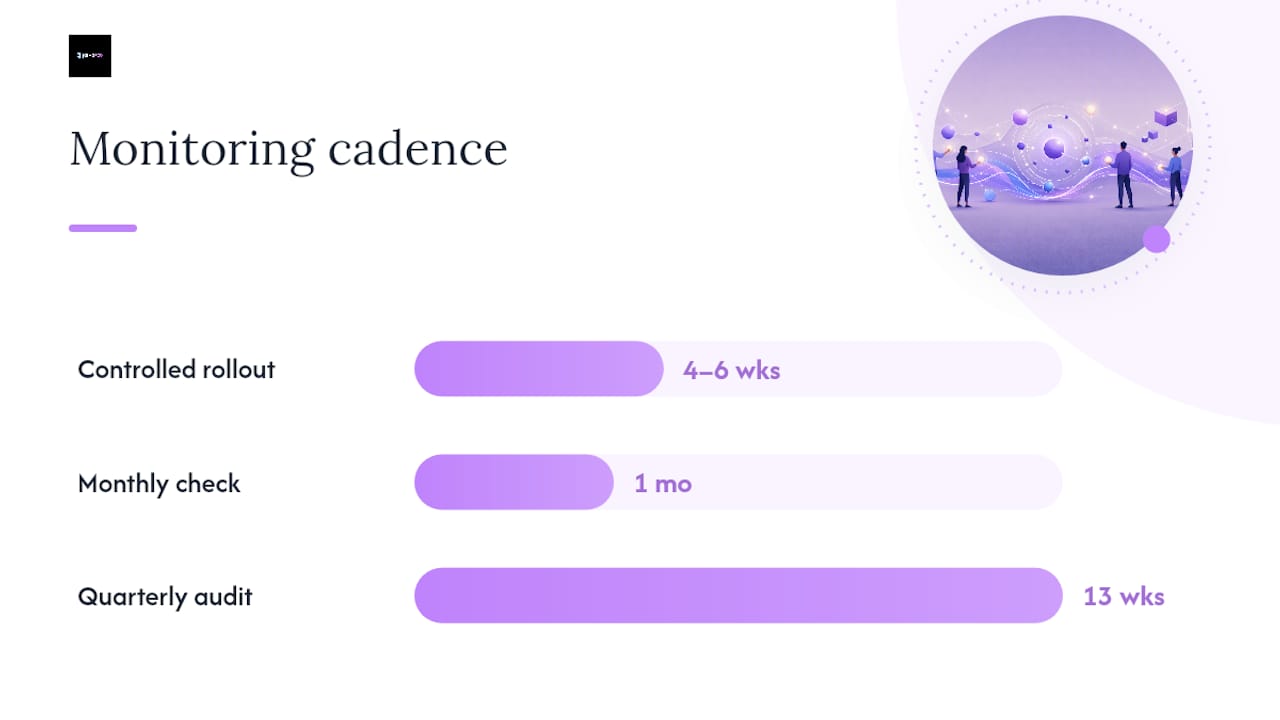
Attribution is the hard part. Internal linking changes rarely produce an overnight spike, and isolating their effect from algorithm updates, seasonality, or new backlinks takes discipline. The most reliable approach is a controlled rollout: make linking changes to one cluster, leave a comparable cluster untouched, and compare movement over four to six weeks. It's not a perfect experiment, but it's far more informative than "we changed everything at once and traffic went up."
On cadence, a monthly quick check, scanning for new orphan pages and broken links from recently published content, keeps small problems from compounding. A full quarterly audit across Screaming Frog, Semrush, and Search Console catches the structural drift that monthly checks miss, particularly crawl depth reports and link distribution dashboards that reveal whether your pillar pages are still receiving the volume of internal links they need to stay competitive.
What checklist does Jarvis & Co use when wiring topic clusters?
When we build or repair a client's internal linking, we run through the same ten checks every time, regardless of the site's size or industry.
- Every pillar page has at least five cluster pages linking into it.
- No commercially important page sits beyond three clicks from the homepage.
- New content gets at least one contextual link within 48 hours of publishing.
- Anchor text varies naturally and never repeats "click here".
- Redirect chains are eliminated, not just shortened.
- Orphan pages are checked monthly, not just during a full audit.
- Navigation menus don't try to hold more than the site's genuine top-level categories.
- Power pages, the ones with the strongest backlink profiles, are identified and used to lift newer content.
- Internal link distribution is reviewed for hoarding, where one page absorbs far more links than it needs.
- Every structural change gets documented with a date, so future audits can trace cause and effect.
We track power pages and inlink distribution as ongoing metrics rather than one-off audit findings, because a site's linking health degrades gradually, not overnight. If you're rebuilding a site from the ground up, our guide to SEO-friendly web design for SMEs covers how architecture decisions made at the design stage affect linking later, and our website migration checklist is worth reading before any redesign that touches URLs.
Should you automate internal linking or handle it manually?
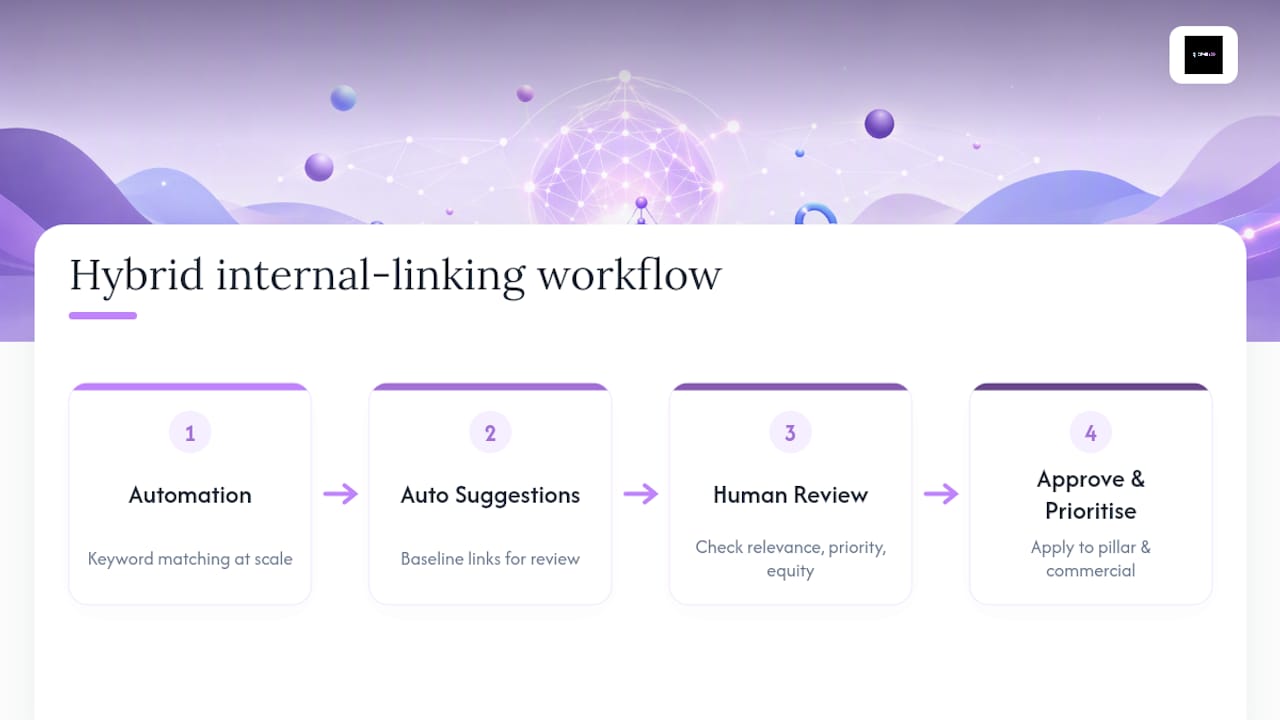
Automated internal linking tools, usually plugins that scan your content and insert links based on keyword matching, solve one problem well: volume. If you're publishing dozens of articles a week and manually linking each one isn't realistic, automation ensures a baseline level of interlinking happens without anyone remembering to do it.
The trade-off is precision. Automated tools match on keywords, not on genuine topical relevance, which means they'll sometimes link a phrase to a page that's only tangentially related, or miss an obvious linking opportunity because the exact keyword wasn't present. They also tend to ignore first-link priority and equity distribution entirely, treating every match as equally worth linking.
Manual linking, done by someone who understands the site's architecture and knows which pages need the equity boost, produces better individual decisions every time. The problem is scale: manual linking doesn't hold up once you're publishing at volume, and it depends entirely on whoever's doing it actually knowing the full site map.
The practical answer for most teams is a hybrid: use automation to catch the obvious, high-volume opportunities across a large content library, then have a person manually review and adjust links on your pillar pages and highest-priority commercial pages, where getting the anchor text and placement exactly right actually moves the needle. Automation handles the floor, human judgement handles the ceiling.
What do real internal linking fixes look like in practice?
The clearest examples of internal linking working aren't dramatic. A B2B site that discovers, through an audit, that its best-converting service page has zero internal links pointing to it from the blog, despite forty published articles on adjacent topics, will typically see that page's organic visibility improve within weeks of adding five or six contextual links from relevant posts. Nothing else changes, no new content, no new backlinks, just links that should have existed already.
A content-heavy site with hundreds of blog posts often finds the opposite problem: link equity concentrated almost entirely on three or four old, high-traffic posts, while a hundred newer articles sit with one or two internal links each. Redistributing some of that concentrated equity, deliberately linking from the high-authority posts down into recent, relevant content, tends to lift the newer pages' crawl frequency and indexing speed noticeably.
The common thread across both examples is that the fix was structural, not creative. Nobody needed to write new content or chase new backlinks. They needed to look honestly at what was already linking to what, find the gaps, and close them with the pages that already existed. That's the pattern worth remembering: internal linking problems are almost always fixable with what you've already published, provided someone actually runs the audit to find them.
Why internal linking has to be a recurring habit, not a project
Most clients treat internal linking as a task with an end date: audit it once, fix the obvious problems, move on. That's the single biggest mistake I see. Every new page you publish creates a fresh linking decision, and if nobody's making that decision deliberately, your site drifts back towards orphan pages within months.
The habit that fixes this is small: before you hit publish on anything, ask which two or three existing pages should link to it, and go add those links yourself rather than waiting for a quarterly audit to catch the gap. For a small team without the resources for constant crawling, that single habit, applied consistently, does more than any tool.
— Luke
How Jarvis & Co builds internal linking into your site the right way
Jarvis & Co treats internal linking as part of the build, not an afterthought bolted on after launch. If you've read this far, you already know that fixing crawl depth, orphan pages, and pillar structure properly means combining site architecture, technical SEO, and a genuine content plan, which is exactly the combination most in-house teams struggle to keep resourced month after month.

A typical engagement starts with an audit across your existing pages to map pillars, clusters, and every orphaned page currently invisible to Google. From there we build a linking plan tied to your actual commercial priorities, not a generic template, and implement the fixes directly rather than handing you a spreadsheet and wishing you luck. If your site's architecture needs more than a linking fix, perhaps the navigation itself is fighting you, our website design service rebuilds that structure from the ground up so every future page has a logical home. Get in touch and we'll run a scoped audit of your site's current linking health before you commit to anything.