Run this checklist and you'll cover technical SEO, on-page fundamentals, content quality, backlinks, local signals and AI search readiness in one pass. It works for a two-page brochure site and a 10,000-page ecommerce catalogue alike, though the depth you go into will differ.
Site owners, in-house marketers, and agencies should run it quarterly at minimum, and immediately after any migration, redesign, or CMS change. Search Console changes shape overnight when a site moves platforms, and waiting a quarter to notice is expensive.
If you've only got a week, here's the triage that matters most:
- Days 1 to 2: Crawl the site, check Search Console coverage, fix any indexation blockers.
- Days 3 to 4: Audit titles, meta descriptions, and internal links on your top 20 landing pages.
- Day 5: Check Core Web Vitals and fix the worst offender.
- Days 6 to 7: Review backlink toxicity and confirm structured data is valid.
Pro Tip: Screenshot your Search Console coverage report before you touch anything. It's your baseline, and without it you can't prove the audit worked.
Key Takeaways
A systematic SEO audit that prioritises crawlability, on-page fixes, and AI search readiness by impact and effort consistently outperforms an unstructured list of technical warnings.
| Point | Details |
|---|---|
| Fix crawl and index issues first | Nothing else on the checklist matters if pages aren't crawlable or indexed correctly. |
| Use three priority labels | Sort every finding into Critical, High, or Medium with a clear fix deadline for each. |
| Chase high-impression, low-CTR pages | These pages already rank; refreshing titles and content unlocks traffic fastest. |
| Prepare for AI citation | Clear entity signals, valid schema, and citable statistics improve visibility in AI Overviews and chat tools. |
| Get a professional audit run | Jarvisandco runs a full one-week audit sprint with a prioritised roadmap for UK small businesses. |
Table of Contents
- SEO audit checklist framework and priority system
- How do you run a technical SEO audit checklist?
- What should an on-page SEO audit check?
- How do you audit content quality and intent match?
- How do you audit backlinks and off-page signals?
- How do you check local and AI search readiness?
- How do you prioritise and report SEO audit findings?
- What tools do you need to run an SEO audit?
- How Jarvisandco applies this checklist for clients
- What tools miss and where agency judgement matters
- Get a tailored SEO audit from Jarvisandco
- Sources
SEO audit checklist framework and priority system
A checklist without a priority system is just a list of anxieties. You need a way to sort findings into what gets fixed today, what waits until next sprint, and what can sit in the backlog without doing real damage.
Split your audit into six categories, each covering a distinct slice of ranking risk:
- Technical SEO — crawlability, indexation, site speed, security, and site architecture.
- On-page SEO — titles, meta descriptions, headings, images, and internal linking.
- Content quality — thin pages, duplicate content, intent mismatch, and E‑E‑A‑T signals.
- Off-page and backlinks — link profile health, toxic links, and reclaim opportunities.
- Local and AI search readiness — Google Business Profile consistency, schema, and AI citation potential.
- Reporting and prioritisation — turning findings into a roadmap stakeholders will actually act on.
Every issue you log should carry one of three priority labels:
- Critical — blocks crawling, indexation, or causes ranking loss. Fix within 48 hours. Examples: noindex tags left on live pages, broken canonical chains, server errors on money pages.
- High — measurable ranking or conversion impact, but not actively breaking anything. Fix within two weeks. Examples: missing title tags, slow Core Web Vitals scores, orphaned high-value pages.
- Medium — worth doing, low urgency. Fix within the next quarter. Examples: image alt text gaps on low-traffic pages, minor schema warnings.
A downloadable audit spreadsheet is standard practice in agency workflows, and building your own is worth the hour it takes. Structure it with one tab per category above, plus a master tab that pulls in everything by priority. Columns should include: URL, issue description, category, priority label, owner, ETA, and a notes field for context that won't fit in a status update. Keep it editable. The moment a spreadsheet becomes a static PDF, nobody updates it, and your audit dies the day you send it.
Pro Tip: Add a "verified fixed" column with a date stamp. Six months from now, when someone asks whether the redirect chains were ever actually resolved, you'll have an answer instead of a guess.
How do you run a technical SEO audit checklist?
Start here because nothing else matters if pages aren't crawlable or indexable. You can write the best title tag in the world; it won't help if Googlebot can't reach the page.

Crawlability and indexation
Run a full site crawl using Screaming Frog or Sitebulb, then cross-reference the results against Google Search Console's coverage report. Discrepancies between what your crawler finds and what GSC reports indexed are where problems hide.
Check these specifically:
- Robots.txt — confirm it isn't blocking sections it shouldn't, and that it correctly references your sitemap location.
- XML sitemap health — sitemaps should list only canonical, indexable URLs, following the sitemaps protocol. A sitemap full of redirected or noindexed URLs signals a messy site to search engines.
- GSC coverage anomalies — look for spikes in "Excluded" or "Crawled, currently not indexed" categories, both common after a migration.
- Orphaned pages — pages with no internal links pointing to them rarely get crawled regularly, however good the content.
For very large sites, run big crawl jobs on a staging environment first rather than hammering your live server. It also lets you test fixes before they go anywhere near production.
Redirects and canonicalisation
Redirect chains and loops waste crawl budget and dilute link equity. Pull every 3xx status code your crawler finds and check for chains longer than one hop. A URL that redirects three or four times before landing on its destination should be flattened to a single redirect.
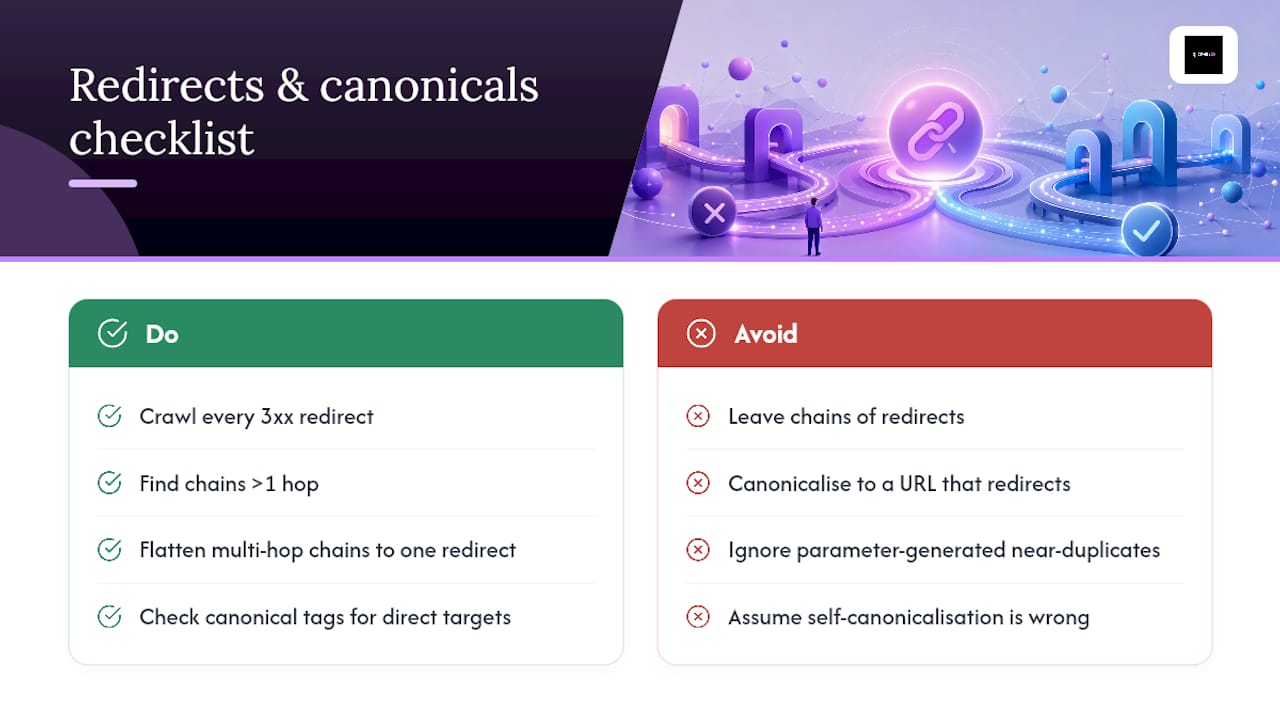
Canonical tags deserve the same scrutiny. A page canonicalising to itself is fine. A page canonicalising to a different URL that then redirects elsewhere is a mess that confuses indexation signals. Check URL parameters too, particularly on ecommerce sites where filters and sorting options can spawn thousands of near-duplicate URLs that dilute your crawl budget.
Core Web Vitals and performance
Google's page experience signals still matter, and the three metrics to check are Largest Contentful Paint (LCP), Interaction to Next Paint (INP), and Cumulative Layout Shift (CLS). Aim for an LCP under 2.5 seconds, INP under 200 milliseconds, and CLS under 0.1.
Run PageSpeed Insights against your top ten landing pages by traffic, not your homepage alone. The fixes that move the needle fastest are usually:
- Serving images in WebP format instead of JPEG or PNG.
- Implementing browser caching so returning visitors don't re-download static assets.
- Removing or deferring render-blocking JavaScript that delays the largest visible element from painting.
- Compressing and lazy-loading below-the-fold images.
If your site's built on a CMS with a lot of unoptimised third-party scripts, this is often where design decisions and technical SEO collide. Our guide to SEO friendly web design covers how layout choices at the build stage prevent these problems rather than patching them after launch.
Security checks
HTTPS should be non-negotiable in 2026, but validity still slips. Check your SSL certificate hasn't expired, confirm there's no mixed content (HTTP resources loading on HTTPS pages), and scan for server errors that spike under load. If your site handles form submissions or logins, confirm rate-limiting is in place to stop bot traffic from skewing your analytics and hammering your server resources.

Re-run your full crawl after every fix batch, and always after a migration or redesign. Fixing five issues and assuming they've stuck without verification is how audits quietly fail. HubSpot's guidance on conducting audits that drive traffic growth makes the same point: crawl and index fixes are consistently the highest-impact quick wins available, ahead of almost anything else on this list.
What should an on-page SEO audit check?
On-page factors are where most site owners start, and for good reason: they're visible, editable without developer involvement, and directly influence both rankings and click-through rate.
Title tags and meta descriptions. Every indexable page needs a unique title tag that reflects search intent, not just a keyword stuffed in for the sake of it. Meta descriptions matter less for rankings but heavily influence whether someone clicks. Worth knowing: Google often rewrites many meta descriptions rather than using what you've written, so chasing an exact character count is largely wasted effort. Write for relevance and intent match instead, and accept that Google will sometimes have the final word.
Heading structure. Each page needs one H1 that clearly states what the page is about, with H2s and H3s that organise supporting content logically. Keyword placement matters most in the opening 100 words of body copy and in the first H2, where both users and search engines look for confirmation they've landed in the right place.
Image optimisation. Every meaningful image needs descriptive alt text, not for SEO alone but for accessibility. Tools like WAVE flag accessibility gaps quickly, and fixing them tends to improve page experience scores as a side effect. Compress images and serve them in WebP where your CMS allows it.
Internal linking. Run a link-sweep to find orphaned pages, then prioritise adding internal links from high-authority pages toward your conversion pages. Product and service pages that convert well but rank poorly are usually starved of internal link equity, not lacking in content quality. Our breakdown of product page SEO covers how to sequence these fixes for ecommerce specifically.
Schema markup. Check that your key templates carry appropriate structured data: Product schema on product pages, Article schema on blog posts, FAQPage schema where you've got genuine Q&A content, and LocalBusiness schema on your contact or location pages. If you're on WordPress, the Yoast SEO plugin handles a good chunk of this automatically, though it's worth spot-checking the output in Google's Rich Results Test rather than trusting it blindly.
Pro Tip: When auditing titles at scale, export every title tag into a spreadsheet and sort by length and duplication. Duplicate titles across category and filter pages are one of the most common issues we find in ecommerce audits, and they're invisible until you look at the list all at once.
How do you audit content quality and intent match?
Technical fixes get a site crawlable. Content quality is what keeps people on the page once they've clicked through, and it's the section most audits skip because it's slower and more subjective than checking status codes.
- Build a content inventory. Export every indexable URL with its organic traffic, conversions, and target keyword. A spreadsheet with these four columns alone will show you, within an hour, which pages are carrying the site and which are dead weight.
- Score each page against search intent. Does the page actually answer what someone searching that term wants? A product page ranking for an informational query, or a blog post ranking for a transactional one, is a mismatch worth fixing regardless of traffic volume.
- Flag thin and duplicate content. Pages under roughly 300 words with no clear purpose, and pages that substantially repeat another page's content, both dilute your site's overall quality signal. Decide for each one: refresh, merge into a stronger page, or remove and redirect.
- Prioritise high-impression, low-CTR pages first. These are pages Google already trusts enough to show, but the title or snippet isn't earning the click. Refreshing these pages is consistently one of the fastest ways to unlock extra traffic, often faster than chasing new rankings from scratch.
- Add E‑E‑A‑T signals where they're missing. Author bios with real credentials, citations to primary sources, and publication or last-updated dates all help. Place author bios near the top or bottom of the article, and citations inline where the claim actually appears, not bundled into a single reference list at the end.
Cannibalisation deserves a specific mention. If three blog posts all target the same keyword, they're competing against each other for the same ranking slot instead of reinforcing one page's authority. Merge the weaker two into the strongest, redirect, and watch that consolidated page climb faster than any of the three did alone.
For teams struggling to keep refresh cycles consistent, our content calendar examples for small teams offer a structure for scheduling refreshes alongside new content, so the audit backlog doesn't just grow every quarter without ever shrinking.
How do you audit backlinks and off-page signals?
Your backlink profile is the part of SEO you control least directly, which is exactly why it needs a scheduled check rather than a one-off glance.
- Export your full backlink profile using Ahrefs, Semrush, or Google Search Console's links report, and log referring domains, anchor text distribution, and link freshness.
- Check for anchor text over-optimisation. A profile where 40% of links use the exact same commercial keyword as anchor text looks manipulative to search engines, even when every link was earned legitimately.
- Run a toxicity check on referring domains, flagging spam networks, expired-domain link farms, or clearly irrelevant sites. Disavow only the genuinely toxic ones. Most sites over-disavow out of nervousness rather than actual risk, and it rarely helps.
- Reclaim unlinked brand mentions. Search for your brand name across the web, find mentions with no link back to your site, and send a short outreach email asking for one. This is consistently the highest-return, lowest-effort item on the backlink checklist.
- Run a competitive gap analysis. Pull backlinks pointing to your top three competitors that don't point to you, and build a shortlist of realistic outreach targets from that list rather than starting from zero.
Treat backlink toxicity checks as a Medium priority unless you've had a manual action or an obvious negative SEO attack. Unlinked mention reclamation, by contrast, belongs in your High priority bucket. It's quick, low-risk, and the links tend to be genuinely relevant since someone already chose to write about you.
How do you check local and AI search readiness?
AI search readiness is the newest addition to any serious audit, and it overlaps heavily with the structured data and clarity work you'd do for local SEO anyway.
- Local signals, where relevant to your business: check Google Business Profile completeness, confirm NAP (name, address, phone) consistency across your website, citations, and directories, and monitor review volume and response rate.
- Schema for AI extraction: confirm FAQPage, HowTo, Product, and LocalBusiness schema validate correctly, referencing Schema as the canonical standard for markup vocabulary.
- Test AI visibility directly. Search your key topics in Google's AI Overviews, Perplexity, and ChatGPT, and see whether your content gets cited. If competitors appear and you don't, check whether your content states facts as clearly and directly as theirs does.
- Check robots.txt for AI crawler access. Confirm you haven't accidentally blocked GPTBot, Google-Extended, or PerplexityBot if you want your content eligible for citation, and that you've deliberately blocked them if you don't.
AI visibility improves most through clear entity signals, structured data, and citable statistics, not through tweaking meta descriptions or chasing small on-page tweaks. If a page states a specific figure with a named source, clearly, in the first few sentences, it stands a far better chance of being lifted into an AI-generated answer than a page that buries the same fact three paragraphs down after a long preamble.
How do you prioritise and report SEO audit findings?
An audit that produces a 40-page document nobody reads has failed, whatever it uncovered. Findings need to become a roadmap someone can execute against.
- Build an impact × effort matrix. Plot every finding on two axes: how much ranking or revenue impact fixing it will have, and how much developer or content time it takes. High impact, low effort items go first, always. High impact, high effort items get scoped into the next sprint. Low impact, high effort items sit in the backlog until priorities shift.
- Cluster template-level fixes separately from page-level fixes. A missing meta description on one page is a five-minute fix. A missing meta description tag across an entire product template affecting 3,000 pages is a single development ticket that fixes all 3,000 at once. Always look for the template-level pattern before assigning page-by-page fixes.
- Structure your report with columns stakeholders will actually read: issue, priority, estimated effort, expected impact, and owner. Skip the technical jargon in this view; save it for the appendix.
- Build a one-week sprint around your Critical and top High-priority items, then schedule remaining High-priority fixes across the following two to three weeks.
- Monitor the right metrics post-fix: indexed page count in GSC, coverage report trends, Core Web Vitals scores, and organic clicks on the specific pages you touched. Site-wide organic traffic is too noisy a metric to prove a specific fix worked.
Pro Tip: Never present a stakeholder with more than five priorities at once. If your audit surfaces fifty issues, that's fine internally, but the report they see should show five, with the other forty-five available on request. Overwhelm kills momentum faster than any technical problem does.
What tools do you need to run an SEO audit?
You don't need an expensive stack to run a solid audit. Google Search Console, Google Analytics 4, and PageSpeed Insights cover the free essentials, and every finding above can be pulled from those three plus a crawler.
Screaming Frog and Sitebulb are the two crawlers worth learning properly. Screaming Frog's free tier covers sites up to 500 URLs, which is plenty for most small business audits. Sitebulb's visual reporting tends to work better when you need to explain findings to a non-technical stakeholder.
Paid platforms like Ahrefs and Semrush earn their cost once you need backlink data or keyword gap analysis at scale; neither Search Console nor a crawler alone will show you what competitors rank for that you don't. For smaller audits, free tools such as Ranksector's toolset can cover quick checks without a subscription commitment.
Build your template once, in a spreadsheet with tabs matching the six categories from earlier in this checklist, and reuse it for every site you audit. As for frequency: run a light technical check monthly, a full audit quarterly, and an immediate full re-audit after any migration, redesign, or significant CMS change. If you're planning a rebuild, our guide to website redesign costs is worth reading before the project starts, since audit findings often change the redesign scope.
How Jarvisandco applies this checklist for clients
Our standard audit sprint runs across a working week. Days one and two cover the technical crawl and Search Console cross-check. Days three and four focus on on-page and content review against competitors in the client's specific market. Day five covers backlinks and local signals where relevant. We deliver a prioritised report, not a raw data dump, because a client running a trades business doesn't need forty rows of crawl errors; they need to know what to fix first and why.
Migration re-checks follow the same structure as our website migration SEO checklist, run 48 hours after go-live and again at the two-week mark, since indexation shifts don't always show up immediately.
What tools miss and where agency judgement matters
Here's what tools consistently get wrong: they flag volume, not priority. A crawler will happily report 200 "issues" on a five-page site, most of which are cosmetic warnings that have never once affected a ranking. Reading a raw crawl report and reacting to every red flag is the single most common mistake we see in client audits, usually from teams who've just bought their first crawler licence and are, understandably, alarmed by the numbers.
The fix isn't a better tool. It's asking, for every finding, "does this affect crawlability, ranking, or conversion, and by how much?" Tools surface the list. Judgement decides what matters. When you report findings to stakeholders, lead with business outcomes, lost traffic, missed conversions, damaged trust, never with technical severity scores that mean nothing outside an SEO team.
Get a tailored SEO audit from Jarvisandco
Running this checklist properly takes real time, and most in-house teams are already stretched thin managing everything else on their plate. Jarvisandco runs the full audit sprint for you, including the migration safety checks and prioritised roadmap, so you get a clear list of what to fix first rather than a fifty-item spreadsheet with no sense of order.

Our audit package covers technical crawlability, on-page and content review, backlink health, and AI search readiness in a single one-week turnaround, delivered as a report your whole team can actually act on, not just your developer. If a redesign or rebuild comes out of the findings, that's a conversation we can have off the back of the same audit rather than starting from scratch with a new brief.
Get in touch through our website design services page to request a tailored audit, and we'll come back to you with scope and timing within a couple of working days.
Sources
- The Technical SEO (& Beyond) Site Audit Checklist - Moz